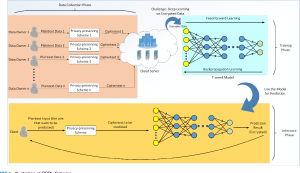
Personalized product recommendations have become indispensable for online platforms to enhance user experience and increase customer engagement. By tailoring suggestions based on consumers’ preferences, platforms can offer relevant and enticing options, leading to improved customer satisfaction and higher conversion rates. However, the collection and use of personal data for generating personalized recommendations raise privacy concerns among users.
To address these privacy challenges, we propose an innovative approach that leverages differential privacy to design privacy-preserving personalized recommendation policies. By introducing randomness into the recommendation outcomes, we can thwart inference attacks and protect consumers’ sensitive information. This article aims to provide an overview of our research on the theoretical model and its economic implications, offering valuable insights for both practitioners and regulators.
Theoretical Model: A Coarse-Grained Threshold Policy
In our theoretical model, the recommendation policy selects products to suggest based on consumers’ preference rankings, which are learned from personal data such as cookies. To maintain privacy, we introduce differential privacy into the process, ensuring that the recommendation outcomes do not reveal specific individuals’ preferences. The optimal policy, in this case, is a coarse-grained threshold policy.
Under the threshold policy, products are randomly selected for recommendation, and a subset of these products is assigned higher recommendation probabilities than the rest. The selection of the priority subset is determined by applying a threshold to the consumer’s preference ranking. This randomization of recommendations prevents adversaries from inferring individual preferences, thus safeguarding consumer privacy.
Image by: https://www.mdpi.com/2079-3197/7/3/42
Economic Implications: Privacy Protection and Consumer Surplus
We also explore the economic consequences of privacy protection in personalized recommendations. When product prices are predetermined, implementing privacy protection reduces consumer surplus due to the diminished match value of the recommended products. This is because the randomness introduced in the recommendation process may lead to less accurate suggestions, reducing the utility consumers derive from their purchases.
However, when retailers optimally set prices, the impact of privacy protection on consumer surplus becomes non-monotonic. Here, there is a trade-off between recommendation accuracy and price inflation. While privacy-preserving policies might decrease accuracy, leading to some reduction in consumer surplus, it also curtails the potential for price discrimination and ensures fairer pricing practices.
For practitioners and businesses seeking to design personalized recommendation strategies, our study offers valuable insights. By adopting differential privacy techniques, platforms can strike a balance between personalization and privacy, providing users with tailored recommendations while safeguarding their sensitive information.
Regulators can also benefit from our research, gaining a deeper understanding of the economic repercussions of privacy protection. This understanding is crucial in shaping privacy regulations that strike a balance between encouraging personalized services and safeguarding user privacy.
Privacy-preserving personalized recommender systems, empowered by differential privacy, present a promising solution to address privacy concerns in online platforms. By adopting a coarse-grained threshold policy, businesses can protect consumer privacy while offering tailored recommendations.
Our study highlights the economic implications of privacy protection and emphasizes the importance of striking a balance between recommendation accuracy and privacy preservation. As technology and regulations continue to evolve, the adoption of privacy-preserving strategies will play a pivotal role in shaping the future of personalized recommendations in the digital landscape.
I typically compare Windows storage spaces with RAID when explaining it to others. Most IT Administrators have prior knowledge regarding RAID technology. With some recollection, I do recall…]
RAID technology builds redundancy into its file structures and uses advanced algorithms to boost fragment performance. However RAID is primarily associated with handling large amounts of data on disk based systems, there are also software grounded versions available, Virtualization systems often leverage Raid technologies to produce logical volumes that appear to users as a single block device.
Windows storage spaces is an alternative to physical hardware RAID configurations Windows Storage Spaces does n’t come as a tackle- grounded perpetration.
Windows Storage Spaces A provides a full historical account of all operations performed on the array
Microsoft first offered windows storage spaces with its operating system called Windows 8 Windows Storage Spaces is also available besides moment
Storage Spaces Direct was one of the additional features introduced with the initial release by Microsoft; it lets you construct expansive and scalable storehouses. , among other things. Azure integration, deduplication, contraction, and so on.
Image by https://www.bdrsuite.com/
Step 1 Prepare your disks
Prior to beginning the process of combining two pools, make certain that you’ve physically or virtually created sufficient storage devices.
I use three 10 gigabyte hard drives for demo purposes on Windows Garcon 2022. Nevertheless, larger disks will usually be used in real world scripts.
Step 2 produce a Storage Pool
With Director Garçon produce a storage pool Please log into your Windows Garcon and do with the coming way.
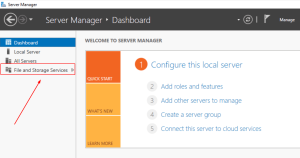
Open Garçon director.
Tap train and storage services
Image by https://www.bdrsuite.com/
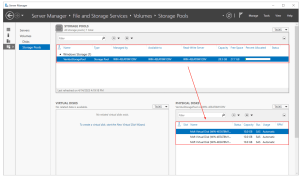
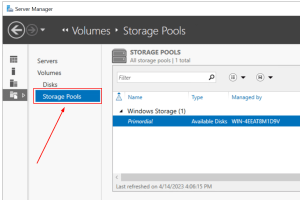
Click on Storage Pools.
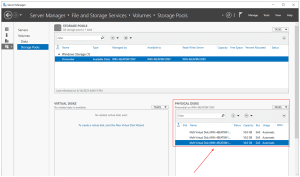
Navigating to Physical Disks will verify that any attached disks are detectable by Windows and can be used for creating a Storage Pool With these 3 harddisks you can build up a storagpool of about 31 GB
Image by https://www.bdrsuite.com/
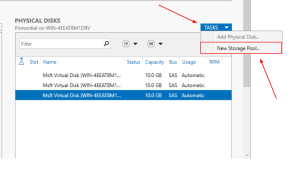
Go to Tasks and click New Storage Pool as well,
Image by https://www.bdrsuite.com/
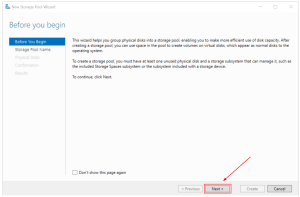
Under” Before you begin,” click Next.
Image by https://www.bdrsuite.com/
Specify your storehouse pool name and subsystem, along with clicking Next On his system, VembuStoragePool was called ‘ WIN-4EEAT8M19V.’ In addition, you may also include a description if desired.
Image by https://www.bdrsuite.com/
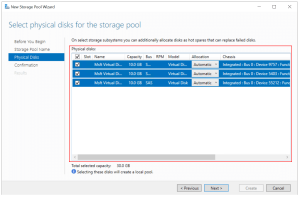
For your physical storage media disks that will be used to form the storehouse pool, select them from within the Physical Disks section. Click Next after selecting all appropriate items. In his particular instance, he labeled all three drives with names that totaled to ten gigabytes (GB) each.
You may adjust how to allocate your fragments, There are three options available
Pools disk capacity with available space to disks automatically.
For faulty disk drives Hot-extra offers an automatic alternative
You can assign a particular amount of capacity for every segment of your homemade arrangement,
Image by https://www.bdrsuite.com/
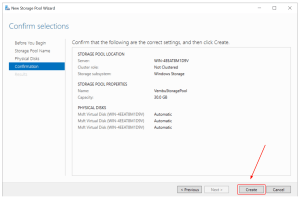
Use evidence to confirm your selections and click produce
Image by https://www.bdrsuite.com/
formerly done, click Close.
Image by https://www.bdrsuite.com/
Congratulations! You’ve configured a new storage pool In Garçon director when navigating to storage pools, a new storehouse pool will be generated In my illustration, the new storehouse pool named ‘VembuStoragePool’ can hold up to 30GB (3disks X 10GB).
Step 3 produce virtual disks
We created a storehouse pool; still, we can not use it. Next, a digital fragment from storage is generated through alternate steps. Then it becomes possible to generate more artifacts for consumption and control within our system of operations,
Open Garçon director.
To access train or storage service options click on the links labeled ‘Train’ and ‘Storage’.
Image by https://www.bdrsuite.com/
Click on Storage Pools.
Right- click on the recently created Storage Pool and also click New Virtual Fragment.
Image by https://www.bdrsuite.com/
choose the storehouse pool and also click OK
Image by https://www.bdrsuite.com/
Under” Before you begin,” click Next.
Image by https://www.bdrsuite.com/
NY sales office data store. If you have at least one physical fragment allocated by Vembu Storage Pool auto-creation, you can use categories for storehouses. Storage categories move lines onto speedy cache for quicker access.
Under quadrangle mindfulness, click Next. Mentally aware geometric forms preserve clones of your data inside isolated repository chambers Quadrangle mindfulness requires that a boy’s garcon have at least three enclosures, and for each quadrangle, the physical disks must use automatic allocation.
Under Storage Layout, elect the storehouse layout and also click Next. You may choose between three layout options: Simple, Equality and Mirror.
In addition, outturn occurs when processing operations can operate on multiple strips at once improving performance by keeping parallel pipelines full There’s no fragment failover forbearance. In my case, three disks with 10 GB each will affect in a 30 GB Simple storehouse layout.
Mirror Storehouse has a layout where A trustable storehouse design that reduces capacity is outlined below The total storage capacity of your mirror storehouse will be 10 GB if each disk has a 10 GB capacity, At minimum you’ll need 5 hard drives to survive from 2 failures
Adding trustability by storing data on multiple drives reduces storage capacity and performance for a equality storehouse layout To cover against a single- fragment failure, use at least three disks. You can rest assured that even if fragments fail, you won’t lose any data. The system recovers from fragmentation automatically.
Under Provisioning, elect Thin or Fixed and also click Next. In thin provisioning volume space is drawn from the store house pool on demand until the size of the volume is reached. To use space from their storehouses as a fixed provision, Fixed is column that uses the volume size value
In Size, choose the specific allotted space for your virtual fragment, which can be a given amount or maximum allowed storage. Then click Next. I use the biggest size for myself.
Confirm the selection and also click produce.
formerly done, click Close.
Step 3: Create virtual disks
We created a storage pool; however, we can’t use it. In the third step, we will create a virtual disk based on the Storage Pool we created in the second step.
Open Server Manager.
Click on File and Storage Services on the left side of the window.
Image by https://www.bdrsuite.com/
Click on Storage Pools.
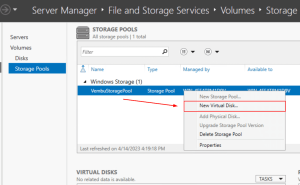
Right-click on the newly created Storage Pool and then click New Virtual Disk.
Image by https://www.bdrsuite.com/
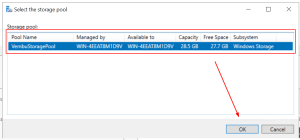
Select the storage pool and then click OK.
Image by https://www.bdrsuite.com/
Under “Before you begin,” click Next.
Image by https://www.bdrsuite.com/
Under Virtual Disk Name, specify the virtual disk name, add a description (optional), and click Next. In my case, the virtual disk name is “StoragePoolVembu.” If you have a minimum of one automatically allocated physical disk, you can enable storage tiers. Storage tiers enable the automatic movement of the most frequently accessed files to faster storage.
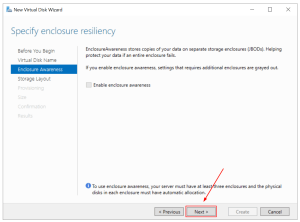
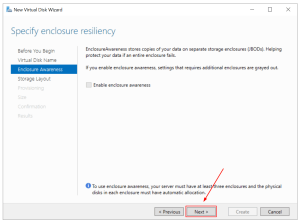
Under Enclosure Awareness, click Next. Enclosure Awareness stores copies of your data on separate storage enclosures. To use enclosure awareness, your server must have at least three enclosures, and the physical disks in each enclosure must have automatic allocation.
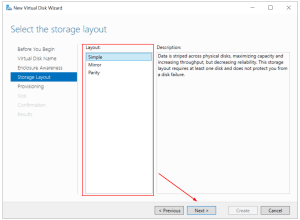
Under Storage Layout, select the storage layout and then click Next. You can choose a Simple, Mirror, or Parity layout:
Simple storage layout – data is striped across all disks, maximizing capacity and increasing throughput. There is no disk failover tolerance. In my case, three disks with 10 GB each will result in a 30 GB Simple storage layout.
Mirror storage layout – data is striped across all disks, creating copies of data. This storage layout increases reliability and decreases capacity. In case of a single disk failure, use at least two disks. If you have two disks of 10 GB capacity each, the total capacity of Mirror storage will be 10 GB. To protect against two disk failures, use at least five disks.
Parity storage layout – data is striped across all disks, increasing reliability but also reducing capacity and performance. To protect against a single-disk failure, use at least three disks. In case of disk failure, your data will not be lost.
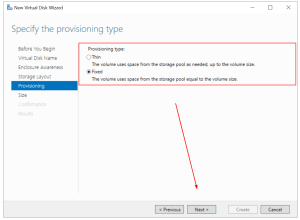
Under Provisioning, select Thin or Fixed and then click Next. For Thin provisioning, the volume uses space from the storage pool as needed, up to the volume size. For Fixed provisioning, the column uses space from the storage pool equal to the volume size.
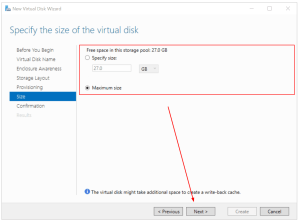
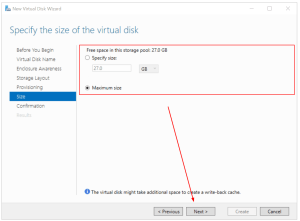
Under Size, specify the size you want to allocate to your virtual disk, could be a specific size or maximum size, and then click Next. In my case, I use the maximum size.
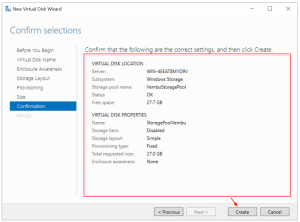
Confirm the selection and then click Create.
Image by https://www.bdrsuite.com/
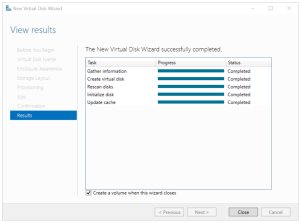
Once done, click Close.
Image by https://www.bdrsuite.com/
A new wizard will open to create a volume. Proceed with the next step.
Step 4: Create a volume
In the fourth step, you will create a volume and prepare it for storing your data.
Under “Before you begin,” click Next.
Image by https://www.bdrsuite.com/
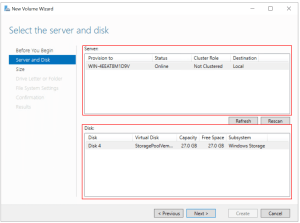
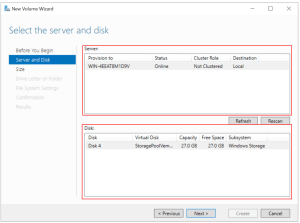
Under Server and Disk, select the server and disk, and then click Next.
Image by https://www.bdrsuite.com/
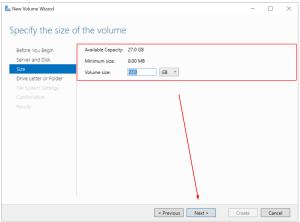
Under Size, specify the size of the volume and click Next. I use the maximum capacity.
Image by https://www.bdrsuite.com/
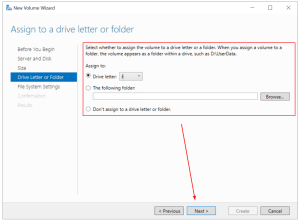
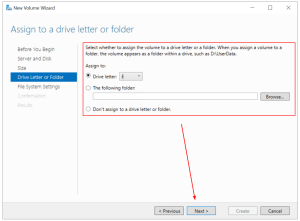
Under Drive Letter or Folder, assign a driver letter and then click Next. I use the volume letter E.
Image by https://www.bdrsuite.com/
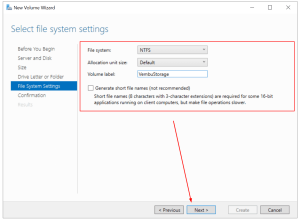
Under File System Settings, select file system settings, allocation unit size, and define the volume label, and then click Next. In my case, I keep the default settings and only change the volume label to VembuStorage.
Image by https://www.bdrsuite.com/
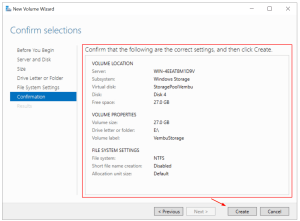
Under Confirmation, confirm selections and click Create.
Image by https://www.bdrsuite.com/
Once done, click Close
Image by https://www.bdrsuite.com/
Open File Explorer and navigate to the newly created volume. This volume is a storage pool that includes three disks, 10 GB each. The total capacity is 30 GB (Simple storage layout).
Wrapping Up
A Storage Pool is a native Windows Server feature that helps you combine multiple physical or virtual disks into a single logical disk. It has been available since Windows Server 2012 and is still supported in Windows Server 2022. Storage Pool provides data redundancy and helps increase performance. The procedure consists of four steps, including installing or preparing disks, creating a storage pool, creating a virtual disk, and creating a volume.
By following this step-by-step configuration guide, you can leverage Windows Storage Spaces to build efficient and reliable storage solutions for your organization’s data needs.
Remember to carefully plan your disk allocation, storage layout, and provisioning options based on your specific requirements. Whether you’re setting up a simple storage layout for maximum capacity or a mirrored layout for increased reliability, Windows Storage Spaces offers flexibility and scalability to meet your storage demands.
Have you encountered the frustrating “printer offline” error when you were all set to print an important document? Don’t worry; you’re not alone. Printer offline issues are quite common, but the good news is that they can be easily resolved with a few simple steps. In this guide, we’ll walk you through the troubleshooting process to get your printer back online and printing smoothly.
Restart Your Computer and Printer One of the easiest and most effective solutions is to restart both your computer and printer. Restarting both devices will refresh their connection and clear any temporary glitches. Always ensure that your printer is turned on and not displaying any error messages before proceeding.
Set Printer as Default If your print jobs fail, it’s possible that your printer is not set as the default printer. Follow these steps to set your printer as the default:
For Windows 10/11:
Go to the Start Menu > Settings > Devices/Bluetooth and Devices > Printers and Scanners.
Select your printer and click “Manage.”
Choose “Set as default.”
For MacOS:
Click the Apple menu and select “System Preferences.”
Choose “Printers & Scanners.”
Right-click on your printer and select “Set as default.”
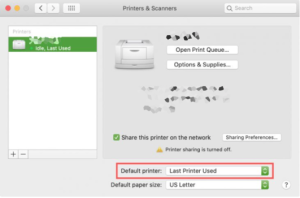
Alternatively, you can select the default printer from the menu at the bottom or choose “Last printer used” as the default.
Image by:https://www.pttrns.com/
Check Cable and Wireless Connections Printer offline issues can also be caused by faulty cables or unstable wireless connections. Check the following:
Ensure that the cables connecting your printer to the computer have no physical damage and are securely plugged in on both ends.
If your printer is connected via Wi-Fi, test the cable connection first to rule out any issues with your wireless network.
Verify that your printer’s network settings show that it is connected to the wireless network.
Image by:https://www.pttrns.com/
Check If the Printer Is in Offline Mode Sometimes, printers may be set to offline mode, preventing them from functioning. Follow these steps to turn off offline mode:
For Windows 10/11:
Click the Start Menu > Settings > Devices (Bluetooth and Devices for Windows 11) > Printers and Scanners.
Select your printer and click “Open queue.”
Ensure that “Use printer Offline” is not selected.
For MacOS:
Click the Apple icon and select “System Preferences.”
Choose “Printers & Scanners.”
Select the printer and click “Open Print queue.”
Click “Resume” if the printing is paused.
Image by:https://www.pttrns.com/
Clear the Print Queue and Restart Print Spooler Stuck print jobs in the queue can also cause the printer to go offline. To clear the print queue and restart the print spooler:
For Windows 10/11:
Type “Command” in the search bar next to the Start menu.
Right-click on it and select “Run as administrator.”
Type “net stop spooler” and press Enter.
Type “del %systemroot%\System32\spool\printers* /Q” and press Enter.
Type “net start spooler” and press Enter.
For MacOS:
Click the Apple Menu and select “System Preferences.”
Choose “Printers and Scanners.”
Select your printer on the left side and click “Open print queue.
Image by:https://www.pttrns.com/
Clear out the print jobs by clicking the X button on the right side.
Image by:https://www.pttrns.com/
Remove and Re-add Printer If the printer still appears offline, try removing and reinstalling it:
For Windows 10/11:
Click the Start Menu > Settings > Devices (Bluetooth and Devices for Windows 11) > Printers and Scanners.
Select the printer and click “Remove Device.”
If the printer reappears after removal, go to Start menu > Settings > Apps.
Find the printer driver, click on it, and select “Uninstall.”
To re-install the printer, go back to Start Menu > Settings > Devices/Bluetooth and Devices > Printers & Scanners.
Select “Add a printer or scanner,” and your computer should automatically scan for connected printers.
If the printer doesn’t appear, choose “The printer that I want isn’t listed” and follow the appropriate steps for your printer type.
Run Software Updates Outdated operating systems or missing patches can sometimes lead to printer offline issues. Ensure your operating system is up to date:
For Windows 10/11:
Type “Windows update” in the Start menu search box.
Select “Windows update settings.”
Click “Check for updates.”
Check for optional updates for your printer software if needed.
For MacOS:
Go to the Apple menu and select “System Preferences” or “System settings” depending on the version.
Select “Software Update” to run the update.
Follow the on-screen instructions to install any available updates.
By following these troubleshooting steps, you should be able to resolve printer offline issues and get your printer back online. Remember to check for physical connections, set the printer as the default, clear the print queue, and keep your operating system up to date. Happy printing!
The Apple ecosystem is renowned for its seamless integration across devices, enabling users to enjoy a connected and cohesive experience. However, it’s not without its challenges. In this article, we’ll explore some of the glaring issues with the Apple ecosystem, shedding light on both its remarkable advantages and potential drawbacks.
The Apple Tax: Everything Costs More
Apple products are synonymous with quality and innovation, but they come with a hefty price tag. From iPhones to MacBooks and iPads, the cost of entry into the Apple ecosystem can be significant. The premium pricing has become a point of contention for many consumers, as it makes Apple products less accessible to budget-conscious users.
Restricted App Store Policies
Apple maintains strict control over its App Store, deciding which apps are allowed and which ones are not. This control has resulted in some popular apps and services, such as Fortnite and game streaming platforms like Google Stadia and Xbox Cloud Gaming, being excluded from the App Store. The limited app options can be frustrating for users seeking a more diverse app ecosystem.
Image by: https://developer.apple.com/
Siri’s Limitations
While Siri was an early pioneer in the virtual assistant space, it has fallen behind its competitors like Amazon’s Alexa and Google Assistant. Siri’s capabilities are more limited, and its compatibility with third-party devices is restricted compared to other voice assistants. Apple’s voice assistant lacks certain features that are readily available on rival platforms.
Image by: https://bgr.com/
Lagging in Cutting-Edge Tech
While Apple has a history of innovation, it has been slow to adopt certain cutting-edge technologies, such as folding phones. Competitors like Samsung have already released foldable devices, leaving Apple users waiting for a response. This delay can be frustrating for tech enthusiasts invested in the Apple ecosystem.
Lock-in Effect: Hard to Leave
The Apple ecosystem can be alluring, enticing users to adopt multiple Apple devices to maximize their experience. Once heavily invested in Apple products, it becomes challenging to switch to rival platforms. This “lock-in” effect can create a sense of dependency on Apple’s ecosystem, limiting user freedom and choice.
Image by: https://9to5mac.com/
Charging Chaos
Apple’s charging solutions have created confusion for users. While the MacBook lineup embraced USB-C, the iPhone and AirPods continue to use the proprietary Lightning connector. Additionally, the Apple Watch requires its own proprietary charger. This lack of uniformity in charging options can be inconvenient for users with multiple Apple devices.
Conclusion
The Apple ecosystem undoubtedly offers a seamless and interconnected experience for users, enabling them to enjoy features like iMessage, FaceTime, and AirDrop effortlessly. However, it’s essential to recognize the potential drawbacks, such as premium pricing, restricted app policies, limited voice assistant capabilities, and delays in adopting cutting-edge tech. Users should carefully weigh the pros and cons to determine whether the Apple ecosystem aligns with their needs and preferences. Whether you choose to embrace the Apple ecosystem or explore alternatives like Android and Windows, the decision ultimately lies in finding the technology that best suits your lifestyle and requirements.
Knowledge Distillation in Neural Networks: Enhancing Model Efficiency
Neural networks are important devices for artificial intelligence which facilitate rapid data processing over large volumes. Increasingly complex and big models accompany an increase in the number of data Resource-constrained devices like mobiles and tablets introduce their own hurdles while attempting to implement AI. The idea of compressing deep models is gaining traction.
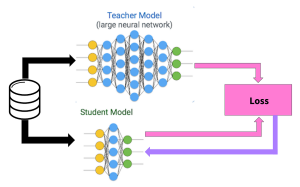
Understanding Knowledge Distillation: A Teacher-Student Model
A teacher would educate their students in a university or school. The student models similarly learn from the teacher model through inference based on its predictions. Then they can accomplish tasks of same quality. This process lets us compact the bigger model, thereby enabling its deployment on limited-resource gadgets.
The Concept of Knowledge Transfer: Soft Targets vs. Hard Targets
Rather than using the one-hot encoding for classes, knowledge distillation utilizes the probabilities produced by the teacher model’s classes. Because they include more information per training example, soft targets promote knowledge transfer more efficiently.
Training the Teacher-Student Model
This learning session initiates through teaching the educator machine using a wide database such as MNIST. The student model trains itself using the soft targets from the teacher model and the target data it generates itself. The usage of easy goals assists in improving the student’s understanding process, allowing for comparable precision with the instructor.
Differences from the Original Paper
We modified the training process slightly for this reproduction. Rather than utilizing dropout, we merely leveraged weight decay during training By messing with how much it runs, we can boost these two types of models. However, notwithstanding those inconsistencies, the general conclusion and trend of the paper remain constant.
Effective modeling is accomplished via knowledge distillation
Our reproduction demonstrated that knowledge distillation is effective. Distilled student models showed higher performance than their counterparts. This technique was found especially useful when handling a transfer set where the learner model performed extraordinarily well, despite not coming across particular classes during training.
Parameter effects and student model accuracy
We found out that the temperature hyper-parameter affects knowledge transfer significantly. Units in the models must be below 100 for temperature to enhance the performance and sustain the velocity.
Bias reduces student model accuracy
Using a bias value optimization to produce a suitable result increased the possibility that transfer sets would be identified with accuracy.
With knowledge distillation, neural networks are optimized and enhanced. Transferring knowledge from big models to small ones lets us reach equivalent precision while decreasing complexity. Opening doors for low-resource deployments with high performance. This essay illustrates the capacity of knowledge distillation for expertise transferring from sophisticated to small neural networks.
Having a stable internet connection is crucial for your Mac to function optimally. However, there may be times when you encounter connectivity issues. Don’t worry! In this comprehensive troubleshooting guide, we’ll walk you through various steps to resolve common internet connection problems on your Mac.
Wait and Retry:
Before diving into complex troubleshooting, it’s essential to give it a moment and try again. Sometimes, the issue could be temporary and related to your Internet Service Provider (ISP). If problems persist, it’s time to take further action.
image by:https://www.anyrecover.com/
Check Network Connection Status:
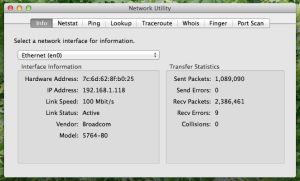
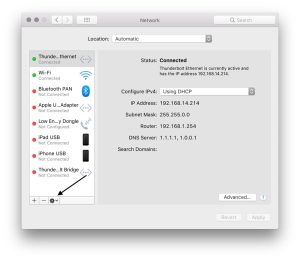
Open the Network settings on your Mac and examine the status of your network connection services, such as Ethernet or Wi-Fi. A green indicator signifies an active and connected service, while yellow indicates an active but unconnected service. If the indicator is red, it means the service has not been set up correctly.
image by:https://austinmacworks.com/
Compare Network Settings with ISP Recommendations:
Ensure your network settings align with the recommendations provided by your Internet Service Provider. Mismatched settings can cause connection problems. Verify that you have entered the latest and accurate information in the appropriate fields to establish a smooth connection.
Image by:https://thesweetsetup.com/
Troubleshooting PPPoE Connections:
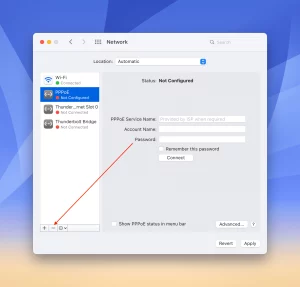
If you are using PPPoE (Point-to-Point Protocol over Ethernet), check the PPPoE Service Name field in Network settings. It should ideally be left blank. However, some ISPs may require specific information in this field. Double-check with your ISP to ensure you have the correct settings for a successful PPPoE connection.
Image by:https://appletoolbox.com/
Conclusion:
By following the steps outlined in this troubleshooting guide, you can efficiently resolve internet connection issues on your Mac. Remember, sometimes the problem might be temporary and related to your ISP, so it’s good to be patient and try again later. If problems persist, the solutions provided here will help you identify and rectify the issue. Now, you can enjoy a stable and reliable internet connection on your Mac once more! If you still face problems, don’t hesitate to reach out to your ISP for further assistance. Stay connected and stay productive!
Introduction to RSAT and Importance in Windows 10
On Windows 10, RSAT allows you to manage Windows Server-based services. Tools like ADUC and Server Manager offer familiarity when managing Windows Server environments from Windows 10 machines.
Microsoft encourages Windows Admin Center (WAC) to be the forthcoming interface for controlling Windows Server. To control certain Windows Server elements efficiently, it is imperative to operate RSAT from a device running Windows 10.
The installation of RSAT in Windows 10 can be accomplished through the Settings App.
The deployment of the Windows 10 edition 1809 leads to the automatic installation of RSAT, which was earlier installed from the Control Panel. The Settings app allows you to install RSAT instead of doing so via the command line. Here’s a step-by-step guide to help you get started:
Your Windows 10 PC should be accessed using the administrator account.
The WIN+I key combination will open the Settings app.
On the Settings app, click the ‘Apps’ option.
On the Apps & features screen, click the Manage optional features option.
On the ‘Manage optional features’ screen afterward, you can click ‘Add a feature’.
Select the RSAT feature you want from the available choices. RSAT tools are installed individually, so select the specific tool you need and click “Install.”
The RSAT tool on your Windows 10 system is being configured right now.
Using RSAT tools, managing Windows Server environments is very simple.
Alternative Method: This PowerShell script installs and removes RSAT.
If you prefer using PowerShell for installation and removal of RSAT tools, here’s how you can do it:
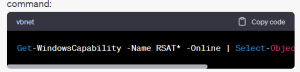
Run a PowerShell prompt with local administrator privileges. To view which RSAT tools are already installed, use the following command:
Image by https://pressmaverick.com/
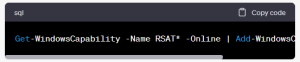
To install all available RSAT tools, run the following command:
Image by https://pressmaverick.com/
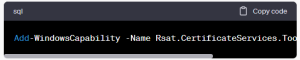
If you wish to add specific RSAT tools, identify the tool’s name using the ‘Get-Windows Capability’ command and include it in the ‘Add-Windows Capability’ command. For example, to install the Certificate Services tools, use the following command:
Image by https://pressmaverick.com/
To eliminate a pre-existing RSAT capability, utilize the Remove-Windows Capability command. For instance, to remove the Certificate Services tools, use the following command:
Image by https://pressmaverick.com/
The key note for Feature-On-Demand and Microsoft Update
Microsoft Update is necessary when you’re installing RSAT as a Feature-On-Demand in Windows 10. Windows Update servers can be located internally within your organization or externally, and both may cause installation issues.
You can either momentarily set up the device to use Microsoft Update or manually choose ‘Search for updates online’ in the Windows Update settings to allow RSAT installation.
The administration of your Windows Server environment can be managed from your Windows 10 device by installing the Remote Server Administration Tools for Windows 10. The RSAT tools may facilitate your everyday administrative responsibilities as Windows Admin Center continues to mould the future of Windows Server GUI management.
An increasing number of smartphones and mobile network providers results in the rising demand for mobile apps. The world in 2020 had an estimated 14.02 billion mobile devices. This number’s expected value of 16.8 billion is projected to be attained in 2023. In spite of the fact that this ascent in cell phones accompanies a test for programming designers – guaranteeing similarity across numerous producers, working frameworks, and equipment settings.
Mobile application developers need to ensure that their products operate smoothly on different systems, gadgets, and networking settings by testing for compatibility. This article explores the significance of compatibility testing and its function in providing high-quality mobile applications.
Image by: https://pflb.us/
Understanding Compatibility Testing
Compatibility testing tests if the software can work with specific hardware, software, and network conditions. Compatibility testing guarantees that an app can function optimally across numerous hardware models, operating systems, and browsers, as opposed to functional testing, which evaluates its features. This examination is typically conducted close to the conclusion of the development period.
Several types of compatibility testing.
There are various categories and types of compatibility testing, each targeting different aspects of mobile app performance:
Hardware Compatibility Testing:
The application’s main functions are tested on various hardware configurations.
Operating System Compatibility Testing:
Evaluates the app’s functioning across numerous operating systems.
Software Compatibility Testing:
Checks that the program operates correctly with other system elements.
Image by: https://pflb.us/
Browser Compatibility Testing:
This test validates the web browser’s congruence with the majority of browsers like Chrome, Safari, Firefox, etc.
Device Compatibility Testing:
The input and output devices’ compatibility with the app is assessed.
Network Compatibility Testing:
It tracks the app’s performance using network speed and bandwidth parameters.
Mobile Device Compatibility Testing:
For the mobile application to function properly on different devices, the testing is tailored specifically.
Importance of Compatibility Testing
Ensuring app compatibility is crucial for several reasons:
Enhanced User Experience:
The testing of competence enables users to be stress-free in using a large number of machines, raising their level of satisfaction.
Competitive Advantage:
The applications that have no compatibility problems stand a better chance than others that have such issues.
Image by: https://pflb.us/
Cost-Effective Solution:
Software development flaws can be identified and corrected before release.
Increased User Base:
Users tend to refer others to apps that have a high degree of usability.
Bug Detection:
The compatibility testing highlights any issues that may not have come up during the functional testing and contributes to a more dependable application.
Image by: https://pflb.us/
The procedure for compatibility testing follows below.
The compatibility test process typically includes the following steps:
Designing Test Cases & Configuration:
Figure out the testing environments and make test cases.
Setting Up Test Cases & Environment:
Deploy the testing surroundings and execute the test cases.
Result Generation and Analysis:
Record and analyze test results for discrepancies or errors.
Rectification & Retesting:
We make sure the app works well after resolving problems.
Tools for assessing mobile app compatibility.
Several tools are available for mobile app compatibility testing, such as:
TestComplete Mobile:
Enables automated UI testing on emulators, real mobile devices, and virtual machines.
Experitest:
Gives quicker testing cycles, mainly for Android systems.
Ranorex Studio:
The app testing for iOS and Android devices is handled by this comprehensive software solution.
Image by: https://pflb.us/
Conclusion
It is crucial to conduct mobile compatibility testing during the mobile app development process to guarantee seamless functioning across numerous platforms and devices. By doing thorough compatibility testing, software developers can provide top-notch applications with great user experiences and beat their competition. Apps can be guaranteed to run properly with a high user satisfaction by utilizing various testing tools on various devices, operating systems, and networks, which ultimately leads to success in the marketplace.
AI has recently made notable improvements and impacted the areas of different industries. ChatGPT, an innovative language model designed by OpenAI, is an exceptional achievement in AI. AI models like ChatGPT have immense potential, but their use raises questions about data privacy.
The Power of ChatGPT
ChatGPT is an AI language model that generates natural-sounding text based on the input given. Chatbots are adept at providing instructional services and creating virtual assistants. The countless potentialities are astounding and they might greatly impact the society.
Privacy Concerns in AI Development
The issue of privacy protection becomes a central point, along with the great excitement about these technological wonders. AI models like ChatGPT are built on large datasets that sometimes contain personal information from users. Training this information is utilized to improve AI systems’ performance. Responsible and ethical AI development must prioritize personal data security and user privacy.
Individuals’ personal information could be retrieved by AI systems. For example, AI can create fabricated information, causing fraud or theft in identity. To deal with these dangers, builders and researchers ought to work collectively to develop pointers and greatest practices for AI growth that give attention to privateness and safety.
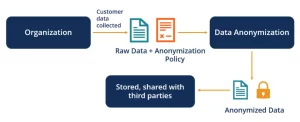
Privacy issues can be minimized by adopting the approaches. By erasing personal data from the data utilized to instruct AI models, developers may lessen the possibility of disclosing private information. Anonymization protects individuals’ identities while allowing AI models to learn and improve.
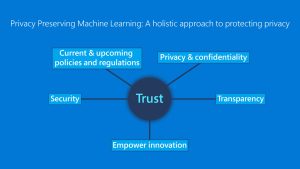
Implementing privacy-protecting machine learning approaches and information anonymity is necessary. Federated learning and differential privacy allow AI models to learn from a diverse range of data sources while safeguarding user privacy. These methods facilitate collaboration while securing sensitive data.
Transparency should be considered when striving for a balance between AI innovation and guarding personal data. The data OpenAI used in their study has been made available to the AI community so they can collaborate with others to discuss recent progresses. In an open discussion, privacy issues are examined, and solutions are designed that prioritize the responsible usage of AI.
The development of laws that guard personal information is extremely vital. To maximize the advantages of AI tools, government bodies and other watchdogs should partner up with AI professionals and engineers to create detailed guidelines. Regulations must safeguard individuals’ private data while also advancing the AI sector.
In summary, AI language models like ChatGPT represent great possibilities and breakthroughs. While development progresses, it is essential that artificial intelligence growth be carefully balanced to safeguard personal information. AI technology may be developed ethically by following privacy-preserving techniques, increasing transparency, and enforcing regulations. We must use the power of artificial intelligence prudently while researching it to prevent any potential negative consequences.
Gaming has taken a vaultforward with the arrival of the PS5 and its innovative DualSense regulator. still, the erected– in microphone in the regulator can occasionallylead to unintentionalawkwardmoments during gaming sessions. Fear not, as we show you how to takecharge and mute your PS5 regulator‘s microphone by dereliction, using it only when demanded.
The Versatile DualSense Controller
Sony’s DualSense regulator is a phenomenon of gaming technology, offering an immersive gaming experience with features like the adaptive triggers and the accessibleprisonerbutton. also, it boasts a erected– in microphone that facilitates flawlesscommunication with fellow players, barring the need for an external headset. Embracing this erected– in microphone point can beprofitable when you want to snappilygive instructions or respond to queries without interposing your gaming inflow. still, the derelictionsetting of having the microphone always on may not be everyone’s mug of tea.
With the microphone actuated by dereliction, players can inadvertently partakefurther than they bargained for. Privateexchanges can be unwittingly broad cast to the entirelobby, and backgroundnoises from the players‘ surroundings may intrude into the gaming experience. This debit has lednumerous gamer to seekways to turn off the microphone when not needed.
Taking Control How to Mute Your PS5 Controller’s Microphone
Muting the DualSense microphone is a breath, thanks to a simplebutton located at the bottom– center of the regulator. A quickvalve on the microphone button mutes the microphone whenever necessary. still, if you prefer a furtherhands– off approach and want the microphone to remainmuted by dereliction, then is how to do it. Navigate to the PS5’s settingsmenu. Select” Sound” from the menuoptions. Access the” Microphone” settings. Toggle the” Microphone Status When Logged In” option to” Mute.” Once you’ve made this change, your PS5 regulator‘s microphone will remainmuted every time you log in or start a multiplayer game. Restassured, your privateexchanges will stay private, and your gaming sessions will befree from unwanted backgroundnoise.
Enabling the Mic On- the- Fly
Upset about missing out on roboticcommunication during gaming sessions? Fret not! If you decide to spark your microphone during a game, all it takes is a simple click of the microphone button. The button will glow orange, indicating that your microphone is nowactive and ready for use.
Conclusion
Gaming Without Oversharing. By derelictionmuting your PS5 regulator‘s microphone, you recapturecontrol over your in- gamerelations and exclude the threat of oversharing particularexchanges or unwanted noises. Should you everask to return to having your microphone active by dereliction, you can alwaysdoso through the settingsmenu. So, take the arm of your gaming experience and enjoy a world of immersive play without any unintendeddislocations. With your microphone under your command, every gaming session will beexactly how you want it to be.