This content is designed for individuals who use digital communication platforms, particularly email, social media, and messaging apps. It’s beneficial for those who want to enhance their awareness of phishing scams and learn how certain personality traits can make them more vulnerable. This article is especially relevant for individuals who value online security and want to protect themselves from cyber threats.

Understanding Phishing and Vulnerability:

Before we delve into the realm of personality traits, it’s essential to grasp the essence of phishing and its nefarious tactics. Phishing involves the art of social engineering, where scammers employ various mediums, such as emails, SMS, or social media, to impersonate reputable entities and manipulate individuals into divulging sensitive data or falling prey to financial scams. While phishing can ensnare anyone, it’s fascinating to discover how specific personality traits can inadvertently tip the scales in favor of the scammers.

1. The Extroverted Dilemma: How Social Traits Play a Role:

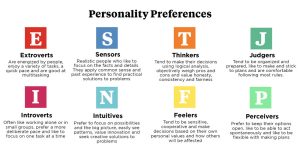
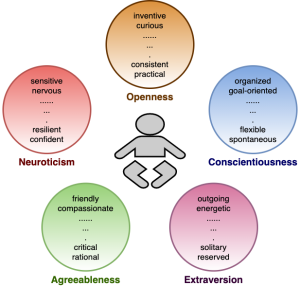
Extroversion, a trait marked by sociability and confidence, may seem like an asset in the real world, but in the digital realm, it can inadvertently become a vulnerability. Research from the University of Toronto reveals that extroverts, driven by their goal-oriented and social nature, may be more susceptible to phishing scams. Scammers exploit their positive thinking patterns, enticing them with urgent messages and clear calls to action. We explore how extroverts’ openness and optimism can inadvertently expose them to cyber threats.
Personality Traits
Image by:https://pivotstrategies.com/

2. Agreeableness Amplified: Exploiting Empathy in Scams:

Agreeable individuals, characterized by their compassion and willingness to help, can find themselves ensnared by scammers who prey on their empathetic nature. Phishing attackers manipulate emotions like pity and desperation, crafting scenarios that tug at the heartstrings of these compassionate souls.
Personality Traits
Image by:https://vahid.blog/

3. The People-Pleasing Predicament: When Kindness Becomes a Risk:

People-pleasers, who often go out of their way to make others happy, inadvertently open themselves up to phishing vulnerabilities. Scammers exploit their eagerness to assist, crafting urgent messages that prey on their desire to be helpful. We examine the delicate balance between goodwill and susceptibility, and how people-pleasers can navigate the treacherous waters of phishing scams.

Personality Traits
Image by;https://alixneedham.com/

4. Trusting the Untrustworthy: Gullibility and its Consequences:

Gullibility, or quickness to trust, is another trait that phishing scammers exploit to their advantage. While trust is a cornerstone of healthy relationships, it can become a liability in the digital realm. We uncover how scammers capitalize on the optimism and idealism of trusting individuals, and contrast this with the skepticism that serves as a shield against their manipulative tactics.

Personality Traits
Image by:https://www.womenworking.com/

5. The Authority Quandary: Balancing Respect and Vigilance:

Respect for authority figures is a virtue, but when taken to an extreme, it can cloud judgment and lead to vulnerability. Scammers often pose as authority figures to induce fear or gain immediate trust. We explore how striking a balance between respect and vigilance is crucial to warding off phishing attempts that exploit individuals’ reverence for authority.

Personality Traits
Image by:https://www.honoredbody.com/

6. Self-Control and Scams: A Critical Connection:

Self-control, a crucial attribute in many aspects of life, plays a pivotal role in the realm of phishing vulnerability. Scammers design their attacks to trigger impulsive reactions, capitalizing on urgency and fear. We delve into the intricate interplay between self-control and susceptibility, offering insights into countering the tactics that scammers employ to exploit this trait.

Personality Traits
Image by;https://www.simplypsychology.org/

Conclusion:

Phishing scams cast a shadow over our interconnected world, targeting individuals regardless of their backgrounds or professions. As we conclude this exploration of personality traits and vulnerability to phishing, the significance of self-awareness shines through. Understanding one’s extroversion, agreeableness, people-pleasing tendencies, trust levels, respect for authority, and self-control can serve as a beacon of protection. Armed with this knowledge, individuals can navigate the digital landscape with resilience and discernment, recognizing the potential pitfalls of phishing and countering them with a thoughtful approach. By pausing, reflecting, and adopting a cautious stance, individuals can shield themselves from the clutches of phishing scams, preserving their digital well-being in an increasingly complex online world.


This article is designed for individuals interested in artificial intelligence, technology enthusiasts, researchers, and those curious about the evolution of AI testing. It benefits readers seeking to understand the relevance of the Turing test in the current AI landscape and explores alternative methods of assessing AI’s capabilities.

Evaluating the Relevance of the Turing Test

Over seven decades ago, Alan Turing introduced the concept of assessing artificial intelligence through a test that gauged its ability to mimic human responses. Known as the Turing test, it played a pivotal role in differentiating between human and machine interactions. However, with the dawn of advanced AI chatbots like ChatGPT and Google Bard, the boundaries between human-like conversation and AI-generated responses are blurring. Let me introduce you top three alternative of Turing Test :

  1. The Marcus Test

    Cognitive scientist Gary Marcus proposed an alternative that centers on an AI’s ability to understand complex visual content like YouTube videos and TV shows without textual cues. The Marcus test challenges AIs to comprehend sarcasm, humor, and intricate narratives from visual stimuli. While current AI models can describe images, they struggle to interpret videos like humans. This approach redefines evaluation by testing AI’s contextual understanding beyond text.

    Turing test
    Image by:https://www.scientificamerican.com/
  2. The Visual Turing Test

    A research paper published in PNAS introduces the visual Turing test—a method that employs image-based questions to distinguish between humans and AI. Instead of text, participants respond to queries using images, mimicking human thinking processes. Notably, AI struggles with images that diverge from real-world norms, allowing this test to assess an AI’s visual comprehension capabilities.

    Turing test
    Image by:https://www.newscientist.com/
  3. The Lovelace 2.0 Test

    Inspired by Ada Lovelace’s assertion that AI can’t generate novel ideas, the Lovelace 2.0 test evaluates AI’s capacity to produce creative concepts beyond its training. Unlike the Turing test, this approach scrutinizes AI’s potential to exceed its programmed limitations. While current AI models lack this ability, artificial general intelligence could meet this criterion.

    Turing test
    Image by:https://www.i-programmer.info/

The Path Forward: Adapting AI Evaluation

As AI rapidly evolves, the traditional Turing test faces challenges in keeping up with AI’s multifaceted capabilities. A future approach might involve a combination of these alternative tests to comprehensively assess AI. This adaptive evaluation landscape will ensure that AI’s proficiency in understanding visuals, generating original ideas, and grasping context-rich content is thoroughly examined.

In the journey to redefine AI assessment, embracing innovation and adaptability becomes imperative. As AI models continue to progress, the evaluation methods must evolve in tandem, reflecting the true spectrum of AI’s abilities. With a dynamic and multifaceted approach, the future of AI evaluation holds promise in capturing the complexity of human-AI interactions.

Conclusion

The evolution of artificial intelligence has ushered in a new era of inquiry into the assessment methods that define its capabilities. The Turing test, which has been the cornerstone of AI evaluation for decades, is now facing challenges as AI technology becomes more sophisticated. As we’ve explored alternative approaches to AI assessment, it becomes evident that a paradigm shift is underway in how we gauge AI’s potential and limitations.

This article is aimed at programmers, developers, and anyone involved in coding activities. Individuals who frequently need to share code snippets, text, or Markdown content will benefit from exploring these Pastebin alternatives. Whether you’re a seasoned coder or a newcomer to programming, this article provides valuable insights into efficient tools for sharing code and text seamlessly.

Introduction: Effortless Sharing of Code and Text

In the realm of coding and collaboration, sharing code snippets and text seamlessly is essential. While Pastebin has been a prominent platform for this purpose, there are alternatives that offer unique features and enhanced user experiences. This article unveils the best Pastebin alternatives that cater to developers, programmers, and individuals seeking efficient ways to share code and text online.

1. Streamlined Sharing and Formatting: ControlC

Sharing code and text doesn’t have to be complicated. ControlC, formerly known as Tinypaste, emerges as a versatile Pastebin alternative. Its simplicity and user-friendly interface make sharing a breeze, even for non-code content. With options for formatting, adding YouTube videos, and text customization, ControlC offers a range of features while ensuring privacy. Whether you’re sharing with or without an account, ControlC proves to be a straightforward solution for quick sharing.

 Pastebin
Image by:https://tipsmake.com/

2. A Visual Approach to Code Sharing: Spectre

For those who prioritize a visually appealing interface, Spectre presents a Pastebin alternative designed for code sharing. Its unique feature lies in the entire interface being an editable text field. This setup not only streamlines the process but also enhances visual clarity. With language-specific formatting options, expiration settings, and the ability to encrypt pastes, Spectre ensures flexibility and customization. Whether you’re a coding enthusiast or a professional, Spectre offers an attractive way to share your code snippets.

3. Markdown-Powered Text Sharing: Rentry.co

Text sharing isn’t limited to code alone. Rentry.co takes a markdown-driven approach, catering to individuals who need to share written content. While it accommodates code sharing as well, its primary focus is on providing a clean and distraction-free environment for writing. With Markdown editing capabilities, quick previews, and the ability to set custom URLs, Rentry.co transforms the text-sharing experience. Whether you’re crafting an article or sharing a code snippet, Rentry.co’s simplicity and markdown integration make it a noteworthy choice.

 Pastebin
Image by:https://alternativeto.net/

4. Privacy-Focused Sharing Solution: ZeroBin

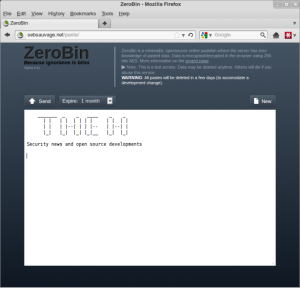
Privacy and security are paramount when sharing sensitive information. ZeroBin steps in as a privacy-focused Pastebin alternative. With options to choose plain text, source code, or markdown, ZeroBin empowers users to control sharing settings. Expiration times, self-destruct options, and password protection ensure that your shared content remains secure. The absence of ads and registration enhances the user experience. When privacy is a priority, ZeroBin serves as a reliable platform for confidential data sharing.

 Pastebin
Image by:https://news.hitb.org/

Conclusion: Elevate Your Sharing Experience

As the coding and text-sharing landscape evolves, these Pastebin alternatives offer tailored solutions to diverse needs. Whether you’re a developer seeking streamlined sharing, a visual enthusiast, or someone focused on privacy, these platforms cater to you. By embracing ControlC, Spectre, Rentry.co, and ZeroBin, you can elevate your code and text sharing endeavors. Choose the platform that aligns with your preferences, and experience the efficiency and enhanced features each alternative brings to the table.

This article is designed for individuals interested in cryptocurrency, particularly those who are active on social media platforms like Twitter. It caters to cryptocurrency enthusiasts, traders, and social media users who want to understand the workings of crypto scams on Twitter, how to identify them, and how to protect themselves from falling victim to such scams.

Understanding Crypto Scams on Twitter: The Deceptive Game

In the vast landscape of cryptocurrency, where innovation meets investment, there also exist malicious actors seeking to exploit the unaware. Twitter, a platform of diverse voices, has become a breeding ground for crypto scams. This article unveils the tactics employed by scammers and equips you with the knowledge to stay vigilant and protected.

Decoding the Anatomy of a Twitter Crypto Scam

Picture this: you’re on Twitter, discussing crypto, and suddenly, you’re bombarded with messages promising astonishing crypto rewards. These Twitter crypto scams are more than a mere annoyance—they’re a threat to your security. Let’s dissect the common “crypto giveaway” scam, revealing how scammers play their cards from initiation to deception.

  1. You Receive a Scam Message in Your Twitter Inbox

    Imagine receiving a direct message proclaiming you’ve won a substantial amount of cryptocurrency, often Bitcoin or Ethereum. The bait is set, reeling you into a fabricated narrative of riches.

    Crypto Scam
    Image by:https://beincrypto.com/
  2. You Head to the Exchange to Redeem Your Code

    Armed with a code, you visit a seemingly legitimate crypto exchange provided in the message. You enter the code, create an account, and watch as the promised crypto miraculously appears in your account.

    Crypto Scam
    Image by:https://usa.kaspersky.com/
  3. You Attempt to Withdraw Your Crypto

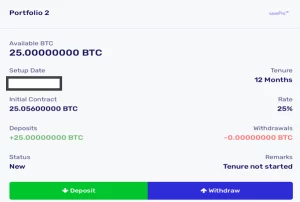
    With your newfound wealth in the exchange, you initiate a withdrawal. However, the façade begins to crack when the process delays, asking for email verification and administrator approval—uncharacteristic of reputable exchanges.

    Crypto Scam
    Image by:https://asec.ahnlab.com/
  4. Scam: Please Deposit Bitcoin to Confirm Your Withdrawal

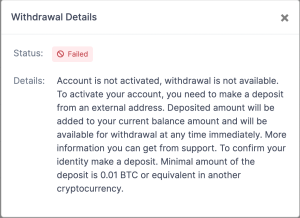
    The climax of the scam unfolds as your withdrawal attempt fails. The demand? Deposit a certain amount of Bitcoin or Ethereum to unlock the withdrawal. Falling into this trap leads to irreversible loss.

    Crypto Scam
    Image by:https://blog.sean-wright.com/

Spotting the Red Flags: How to Identify Crypto Scams

The path of these scams is littered with red flags that, once recognized, can shield you from falling victim:

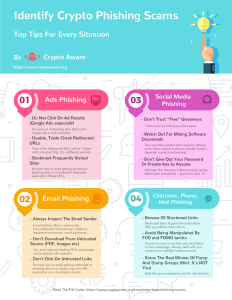
  • Unbelievable Promises: If it sounds too good to be true, it likely is. Beware of unsolicited messages promising massive crypto rewards.
  • Unrelated Competitions: Winning a contest you never entered? Scammers capitalize on your curiosity to engage in their deceitful ploys.
  • Unknown Websites: The exchange or website seems unfamiliar? Exercise caution; it might be a front for fraud.
  • New Accounts or Impersonation: Be wary of accounts with minimal followers, especially if they claim to be reputable figures. Scammers often impersonate to gain trust.
  • Unusual Withdrawal Procedures: Reputable crypto exchanges process withdrawals promptly. If faced with delays and unorthodox verifications, be cautious.

    Crypto Scam
    Image by:https://www.reddit.com/r/

Protecting Yourself: Tips to Avoid Falling Prey to Twitter Crypto Scams

Defend yourself against Twitter crypto scams with these practical strategies:

  • Vigilance: Stay skeptical of unexpected messages and offers, even from seemingly legitimate sources.
  • Research: Verify exchanges, websites, and accounts before engaging. Seek credible sources and reviews.
  • Withdraw to Secure Wallets: Move your cryptocurrency to secure wallets, away from exchanges vulnerable to scams.
  • Secure Communication: Don’t share personal or sensitive information through social media.
  • Educate Others: Spread awareness among your community to collectively combat scams.

    Crypto Scam
    Image by:https://www.cryptopolitan.com/

Navigating the world of cryptocurrencies requires both enthusiasm and caution. By staying informed and discerning, you can actively protect yourself and others from the traps set by malicious actors on platforms like Twitter. Remember, empowerment comes from knowledge, and your vigilance is your best defense.

Email Productivity: Top Features in Spark

In today’s fast-paced world, emails remain a vital mode of communication, but managing them efficiently can be a challenge. If you’re tired of sifting through an overflowing inbox and struggling to keep up, it’s time to explore the remarkable features that Spark offers to enhance your email productivity. Whether you’re a professional handling multiple accounts or an individual seeking a more organized email experience, Spark has the tools you need to streamline your communication efforts.

Unified Email: Streamline Your Inbox Management

One of the standout features of Spark is its Unified setting, designed to simplify your email management. No more toggling between accounts or losing track of messages. With Unified, you can seamlessly integrate multiple email addresses into a single inbox. Whether you use email for work, personal matters, or both, this feature ensures that you stay on top of your correspondence without the hassle of switching accounts. And the best part? Switching focus to a specific account is just a click away, providing you with the flexibility you need to maintain your workflow.

Productivity
Image by:https://www.wbm.ca/

Smart Inbox: Effortless Email Sorting and Prioritization

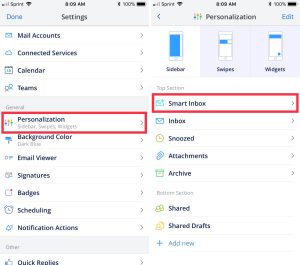
Spark’s Smart Inbox is a game-changer in how emails are sorted and organized. Say goodbye to manually categorizing your emails or digging through folders to find what you need. The Smart Inbox intuitively classifies your emails into three distinct categories: Personal, Notifications, and Newsletters. This automated system allows you to instantly identify the nature of each email, making it easier to prioritize and respond accordingly. And the best part? You don’t need to navigate folders to access them—everything is conveniently presented on a single screen.

Productivity
Image by:https://www.idownloadblog.com/

Timing Tools: Take Control of Email Timing

Timing is everything, especially in the world of emails. Spark understands this, which is why it offers a suite of timing tools to empower your email management. The Snooze feature lets you temporarily remove emails from your immediate view, resurfacing them at a time that suits you best. Whether it’s “Later Today,” “Tomorrow,” or a specific date, you’re in control of when emails reappear. Reminders, on the other hand, keep you on top of follow-ups, ensuring you never miss an important email again. Plus, with push notifications, you’re reminded even when you’re not in the app. And if you need to schedule an email to be sent later, Spark’s Send Later feature has you covered. Craft your email now, and let Spark send it at the designated time, regardless of whether your device is running.

Productivity
Image by:https://timingapp.com/

Assign Options: Collaborate Seamlessly with Your Team

Collaboration is at the heart of many work environments, and Spark’s Assign feature makes it effortless. Instead of forwarding emails to your colleagues, you can assign them directly from Spark. This not only streamlines communication but also keeps your inbox secure and clutter-free. The assigned email seamlessly lands in your teammate’s designated folder, ensuring they can swiftly take the necessary actions. The built-in draft workspace allows for easy communication and collaboration within the app, eliminating the need for lengthy email chains.

Productivity
Image by:https://www.idownloadblog.com/

Conclusion

Spark is more than just an email app—it’s a powerful productivity tool that transforms the way you manage your emails. With features like Unified Email for seamless account integration, the Smart Inbox for automated organization, Timing Tools for precise email management, and Assign Options for effective collaboration, Spark equips you to conquer your inbox and elevate your communication efficiency. Embrace these features, and watch as your email productivity reaches new heights. Say hello to an organized, stress-free email experience with Spark.

This content is designed for individuals seeking effective solutions to establish and maintain a productive daily routine. It caters to those struggling with consistency in habits and tasks and provides insights into how task management apps can transform their routines for better organization and efficiency.

The Struggle of Consistency and the Power of Routines

Do you find that no matter how hard you try, some habits are impossible to form? Whether it’s waking up early, doing exercise, or simply making your bed, a lack of consistency often leads to you giving up.

Routines achieve the opposite of this—by forming consistency in your daily routine, you provide an easier path to get things done while reducing mental resistance. In this article, we’ll look at the best task management apps for building a daily routine, so you can succeed every day.

1. Routinero: Your Ultimate Routine Builder

Routinero is an advanced task management app to create repeating tasks and build a daily routine. You can build new habits by setting individual repeating tasks, or you can compile multiple tasks to form a routine.

Routinero uses subtasks to break your routine into small actionable steps. Routines reset daily, and you can monitor your progress by checking daily streaks.

Scheduling a routine is simple: Hit New from the homepage, enter a title, and press the Schedule dropdown menu. Then, you can schedule a repeat time for the routine by hitting the Start time option. You can access more advanced repeat options by hitting the checkbox beside the Repeat header.

apps
Image by:https://routinery.app/

2. Microsoft To Do: Your Daily Routine Companion

Microsoft To Do is another great app for forming consistent habits. The app syncs with your Microsoft account, so you can access your to-do lists on any device.

The My Day feature is one of the app’s standouts to help build a daily routine. You can add tasks by hitting the plus (+) button in the lower-right corner. Scroll to the right of the options bar to view the Repeat button. You can hit Daily or select Customized if you’d like to exclude weekend days.

The My Day tool also provides smart suggestions to save extra time when building your routine. Hit the Suggestions button at the bottom of the page to view a list of frequently entered tasks.

apps
Image by:https://play.google.com/

3. Any.do: Elevating Your Routine with Productivity Tools

Any.do is another strong task management app that features a My Day section that offers additional productivity tools. You can organize tasks in lists and share your routine with your colleagues by creating work boards.

To plan your daily schedule, hit the My Day button from the bottom navigation bar. Next, you can enter task names and set reminders using the presets above the text box. Alternatively, you can select the Custom button to set your own reminders Like Microsoft To Do, Any.do features suggestions to add to your daily routine ordered by relevance.

apps
Image by:https://www.droidviews.com/

4. Do It Now: Gamifying Your Routine for Motivation

If you’d like to turn your routine into a fun challenge, Do It Now’s gamified approach to task management is guaranteed to keep you motivated. The app uses popular concepts from video games, such as leveling up and earning XP, as an innovative method of task management.

Like an RPG game, you’ll own and build up your character by completing tasks and staying on track. Hit the plus (+) button to add a task and select the circular arrow option to repeat tasks daily. From this page, you can also add skills associated with the task, which will earn you XP.

By completing productive daily tasks such as reading a useful book, you’ll receive a number of coins based on the task’s difficulty. You’ll also level up in different skill sets, including discipline, erudition, and communication. Do It Now is a great app to become the hero of your own productivity journey.

apps
Image by:https://play.google.com/

Conclusion: Elevate Your Routine with Task Management Apps

Consistency is the key to success, but often, it’s easier said than done. Thankfully, these task management apps offer a helping hand to reshape your daily routine and lead you towards a more productive and organized life.

Routinero empowers you to create tailored routines and break them down into achievable steps, ensuring progress through daily streaks. Microsoft To Do syncs seamlessly with your Microsoft account, making it effortless to create and manage tasks while offering smart suggestions to optimize your routine. Any.do takes your routine to the next level by integrating additional productivity tools and the ability to collaborate with colleagues on shared work boards.

This article is designed for individuals who use Apple Notes on either their Mac or iPhone and are looking to enhance their note-taking and organizational skills. Whether you’re new to Apple Notes or an experienced user, these tips will help you better organize your notes and increase your productivity.

Introduction: Unleash the Power of Apple Notes

Are you a devoted user of Apple Notes? While it’s an incredibly useful app for jotting down thoughts and ideas, sometimes managing a multitude of notes can become overwhelming. If you’re searching for ways to streamline your note-taking and boost your productivity, you’re in the right place. In this article, we’ll delve into seven effective techniques to organize your Apple Notes, whether you’re using a Mac or an iPhone. Let’s get started!

1. Organizing Notes in Folders

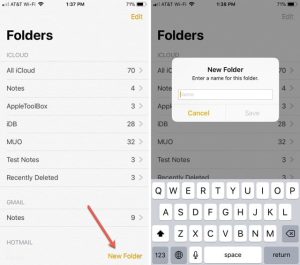
When it comes to maintaining order within your notes, folders are your best friends. On your Mac, you can effortlessly create folders by heading to “File” in the menu bar, selecting “New Folder,” naming it, and dragging related notes into it. For those using an iPhone, tap the “New Folder” button on the Folders screen, provide a name, and tap “Save.” To keep your notes structured, remember to categorize them within folders.

 Apple Notes
Image by:https://appletoolbox.com/

2. Start Using Smart Folders

If you’re dealing with an extensive collection of notes, manual organization can become cumbersome. The solution? Smart Folders. These dynamic folders automatically collect notes based on specific criteria you set. On your Mac, craft a Smart Folder through “File,” “New Smart Folder,” and then tailor filters to suit your needs. Similarly, on your iPhone, tap “New Folder,” insert a name, designate it as a Smart Folder, and apply your desired filters. Let technology do the heavy lifting for you!

 Apple Notes
Image by:https://www.macobserver.com/

3. Search for Specific Types of Notes

Searching for a needle in a haystack of notes? Not anymore. Instead of sifting through keywords, refine your searches by targeting particular note types. Whether it’s attachments, checklists, or shared notes, Apple Notes can narrow down your search results. On your Mac, click the search field, and pick a suggestion. On your iPhone, tap the Search bar in a specific folder to access similar suggestions. Type your keywords and let the app locate your notes promptly.

 Apple Notes
Image by:https://osxdaily.com/

4. Use Emojis in Folder Names

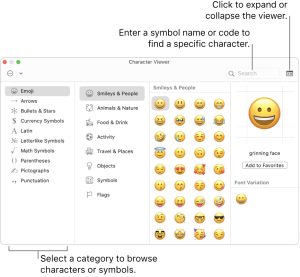
Folders can pile up, leaving you struggling to differentiate them. While Apple Notes lacks customization options, you can inject a dash of personality by using emojis. On your Mac, press Fn + E or access emojis via the Edit menu. For iPhones, enable the emoji keyboard or use specialized keyboard apps. Enhance folder identification by placing emojis before or after folder names—simple yet effective!

 Apple Notes
Image by:https://support.apple.com/

5. Use Custom Images to Differentiate Notes

A picture speaks a thousand words—and can also facilitate organization. Insert images into notes, providing visual cues for swift recognition. On your Mac, drag images from the Photo Browser into notes. Control-click the image to view it as small images. iPhones allow you to tap the camera icon within a note and insert images, enhancing note visual appeal.

 Apple Notes
Image by;https://www.macstories.net/

6. Use Hashtags to Quickly Search Notes

Hashtags aren’t just for social media; they’re excellent organizational tools. Insert a hashtag in your note, creating a tag for easy searches. On your Mac, use Command + Space to initiate Spotlight search, and look for the hashtag. On your iPhone, swipe down to access Spotlight, type your search term, and navigate directly to tagged notes. Effortless retrieval made possible!

 Apple Notes
Image by:https://www.idownloadblog.com/

7. Integration With Calendar and Reminders

Harmonize Apple Notes with Calendar and Reminders for seamless task management. On your Mac, Control-click selected text in Notes to create reminders. For iPhones, use Siri to convert note content into reminders. Similarly, craft calendar events from notes by specifying dates and utilizing Control-click. iPhones offer the same feature by highlighting text and selecting “Create Event.” Integration equals enhanced efficiency.

 Apple Notes
Image by:https://www.idownloadblog.com/

Conclusion

Apple Notes is more than just a note-taking app; it’s a productivity powerhouse waiting to be harnessed. By leveraging these seven strategies, you’ll transform your note-taking into a well-orchestrated symphony of organization. Maximize your potential, conquer your to-do lists, and embrace the new era of efficient note management. Start optimizing your Apple Notes today!

This article is designed for individuals who are looking for user-friendly, customizable, and effective platforms to host their blogs. It offers insights into various blogging platforms and their features, catering to those who value simplicity, design freedom, and content-focused blogging.

Introduction: Diverse Alternatives to WordPress and Blogger

While WordPress and Blogger have long dominated the blogging scene, there exists a realm of alternative platforms that cater to varying preferences and needs. If you’re on the hunt for a unique blogging experience, one that aligns with your style and objectives, read on to discover five outstanding alternatives that could be your perfect match.

1. Medium: Embrace Pure Writing with Minimalistic Design

Medium’s allure lies in its simplicity. For those who prioritize content over complex design, Medium offers a distraction-free environment. Its uniform appearance allows the focus to remain on your writing. While customization options are limited, Medium boasts a strong community of writers, making it an ideal choice for those who wish to connect and share ideas.

Blog
Image by:https://blogpros.com/

2. Tumblr: Unleash Creativity with Microblogging and Customization

With Tumblr, creativity knows no bounds. This microblogging platform accommodates multimedia content, enabling you to express yourself through images, GIFs, audio, and more. While offering customization through themes, Tumblr emphasizes individual posts’ appearance. Navigating Tumblr’s culture and utilizing hashtags are key to expanding your reach.

Blog
Image by:https://en.wikipedia.org/

3. Wix: Seamlessly Design and Grow Your Stand-Alone Blog

Wix caters to those seeking design flexibility without delving into complex coding. Its drag-and-drop interface empowers you to craft visually appealing blogs. Ideal for beginners and those valuing aesthetic appeal, Wix offers a balance between design and functionality.

Blog
Image by:https://support.wix.com/

4. Joomla: Powerful and Versatile Platform for Advanced Bloggers

Joomla is a powerhouse, best suited for those with a penchant for control and customization. Its open-source nature allows for extensive HTML-based design. A robust choice for businesses and larger websites, Joomla’s learning curve is offset by its comprehensive features.

Blog
Image by:https://www.inmotionhosting.com/

5. Ghost: Elegant and User-Focused Blogging with Simplicity

Ghost strikes a balance between design freedom and a user-friendly interface. Perfect for those who appreciate elegant content presentation, Ghost’s live preview tool ensures a polished final product. Its focus on writing and design caters to bloggers seeking a refined platform.

Blog
Image by:https://en.wikipedia.org/

Choosing Your Ideal Blogging Platform: Factors to Consider

When deciding on a platform, consider critical factors such as design tools, hosting options, cost, and reach. Each platform offers a unique balance of these elements. For instance, Medium excels in writing-focused minimalism, while Joomla thrives in customization and versatility.

Conclusion: Finding Your Blogging Oasis Beyond the Usual

Whether you seek simplicity, creativity, or advanced customization, these alternatives present diverse pathways to express your thoughts. As you embark on your blogging journey, remember that the right platform aligns with your goals, allowing your content to shine.

The 8 Best Online Project Management Courses

In today’s rapidly evolving professional landscape, staying competitive often means acquiring new skills and certifications. For those aspiring to enter the world of project management or looking to enhance their existing skill set, enrolling in online project management courses can be a smart move. These courses not only provide valuable knowledge but can also strengthen your resume and open up new career opportunities. Here, we present the eight best online project management courses, both free and paid, to help you make an informed decision about your skill enhancement journey.

1. BrainSensei: Master the PMP Exam

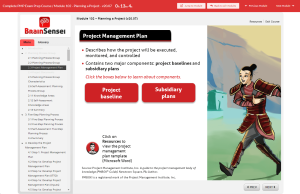
If you’re aiming to prepare for the Project Management Professional (PMP) certification exam, consider BrainSensei’s innovative approach. This online course offers story-based Learning modules that break away from traditional lectures. The PMP Exam preparation course covers both traditional and agile project management practices, providing a comprehensive understanding in 35 contact hours. The course features nine interactive modules, each followed by self-assessment exercises. A standout feature is the inclusion of four practice exams with 800 practice questions to ensure you’re fully prepared. The complete preparation course costs $499.99 and grants access to all materials for one year. You can also explore the free trial to experience the first module of the PMP Exam Prep course.

project management
Image by:https://brainsensei.com/

2. Simplilearn: Comprehensive PMP Training

Simplilearn offers a comprehensive online course designed for those aiming to ace the PMP certification test. The course not only covers core skills but also highlights emerging trends and practices relevant to today’s Project Management Professionals. Emphasis is placed on strategic and business knowledge, essential for excelling as a project manager in diverse organizations. The course spans 35 contact hours and employs experiential learning methods supported by real-world case studies. Upon enrollment, you gain access to digital study materials from PMI, along with four simulation test papers containing 180 questions each. The Simplilearn course is priced at $999, offering flexible access to online classes for 90 days. It encompasses vital skills, including structural breakdown, resource allocation, leadership, Gantt charts, mathematical project scheduling models, project cost estimating, cost management, and more.

project management
Image by:https://www.projectcubicle.com/

3. Alison: Dive Into Project Management

Alison’s Diploma in Project Management course offers an excellent starting point for those seeking to implement project phases with finesse. This free course is designed to acquaint you with the fundamental aspects of project management through a straightforward process. The course is structured into three modules, covering a total of 28 topics. Depending on your pace, you can expect to invest around 10 to 15 hours in completing all the modules. Successfully completing this course equips you with the skills necessary to elevate your career to the next level. Beyond introducing project management methodology, the course delves into essential segments of the system development lifecycle. These segments include planning, design, analysis, and evaluation. Moreover, the course provides accessible resources that can serve as a knowledge base for future endeavors.

project management
Image by:https://www.trustpilot.com/

4. Coursera: Master Project Management

Coursera offers an entirely remote online project management course that you can complete from the comfort of your home. The interactive curriculum includes lectures and hands-on projects, guiding you to acquire crucial project management skills. The project-based curriculum focuses on administering project activities throughout phases like initiation, planning, execution, and closing. Moreover, the course ensures you are well-equipped to implement project management tools and methodologies at any stage of a project. Comprising four courses, each with three units, the course can be initiated for $777. The comprehensive duration of the course is six months, providing ample time to master the skills needed to excel in project management.

project management
Image by:https://www.coursera.org/

5. edX: Introduction to Project Management

For those seeking an introduction to project management, the University of Adelaide offers a free online course through edX. This self-paced course is ideal for individuals who need to manage projects but lack formal training as project managers. The course demands an investment of two to three hours per week, spanning six weeks in total. While participation is free, paid upgrades are available for individuals who want to delve deeper into the subject matter. The edX course imparts fundamental knowledge and applied skills required for managing projects. In addition to developing essential communication skills, you’ll gain insight into the complexities of modern projects. The course employs practical methodologies to provide a solid understanding of project management basics, enabling you to apply these skills to real-life projects regardless of their scope and budget.

project management
Image by:https://pm.umd.edu/

6. University of Washington: Leadership in Project Management

The University of Washington presents the Certificate in Project Management course, tailored to equip you with the skills and confidence necessary to lead complex projects effectively. This online course offers flexible timing and duration, making it accessible to project managers across various industries, including manufacturing, aerospace, construction, and technology. The curriculum aligns with the skills sought by contemporary organizations in their project managers. This includes mastering both Predictive and Agile methodologies, which prove invaluable in managing cross-functional teams and sophisticated projects. The comprehensive course, priced at $4,992, covers essential areas such as project scope management, approach selection, budget and schedule development, strategic leadership, team-building, presentation skills, stakeholder management practices, risk management, and supervision of management procedures.

project management
Image by:https://www.switchup.org/

7. GreyCampus: PMP Certification Training

For project managers aspiring to achieve PMP certification, GreyCampus offers an extensive training program designed to prepare you for success. The training program includes five lesson modules supplemented by additional materials to enhance your learning experience. An added advantage is the inclusion of a live mock exam solving session, where an instructor addresses your queries and ensures you’re exam-ready. The course provides study materials, mentorship, and support for one year. Priced at $1,300, the GreyCampus training grants you unlimited access to live boot camps spanning six months. These boot camps, led by subject-matter experts, comprise four days of intensive training, providing you with the knowledge and confidence to excel in the PMP certification exam.

project management
Image by:https://onlinepmcourses.com/

8. Shaw Academy: Dynamic Project Management

Shaw Academy’s Project Management Certification Course offers a comprehensive journey into the world of project management. With a duration of 17 weeks, the course encompasses 34 lessons accompanied by assessments to gauge your progress. Throughout the course, you’ll learn how to successfully develop, execute, and control projects using the latest tools and techniques. The curriculum is structured into four modules, offering you a holistic experience of the full lifecycle of a standard project. Shaw Academy’s course pricing is set at $69.99/month, granting you unlimited access to the Project Management Certification Course, along with other courses offered by the academy. Additionally, you can enjoy four weeks of unrestricted free access to explore and engage with the course content.

project management
Image by:https://www.courselounge.com/

Elevate Your Career Through Online Learning

In an era of constant technological advancement and evolving methodologies, staying updated with the latest project management trends is essential. These eight online project management courses provide both novice learners and experienced professionals with the means to upskill and excel. Whether you’re seeking to achieve certification, enhance your skills, or transition into a project management role, these courses offer a convenient and accessible way to achieve your goals. Embrace the opportunity to advance your career from the comfort of your own home and equip yourself with the knowledge and expertise needed for success.

This article is designed for individuals who are new to project management software and are looking for guidance on how to get started. It is suitable for both individuals and teams who want to adopt a project management tool to organize their tasks and projects more effectively. This article aims to help readers understand the initial steps, best practices, and potential pitfalls when implementing project management software.

Introduction: Starting Your Project Management Software Journey

When it comes to embarking on a new project management software journey, it’s like starting a project within a project. Each software has its unique features and workflows, and navigating through them can be a learning curve. However, with proper planning and a clear strategy, you can make the transition smoother. In this guide, we’ll walk you through the essential steps to take when getting started with any project management software, along with valuable tips to avoid common pitfalls.

Deciding How You Want to Use Project Management Software

Before you dive into setting up your project management software, it’s crucial to outline how you intend to use it. Your strategy will influence how you organize your tasks, collaborate with team members, and track project progress. Start by answering these fundamental questions:

1. Who Will You Be Working With? Planning for Collaboration

Project management often involves collaboration, so defining who will be using the software is paramount. Identify team members, stakeholders, and anyone else who needs access. Depending on the software and subscription tier, you can allocate different levels of access and permissions. This strategic step helps you tailor the software to match your team’s needs precisely.

For instance, platforms like Notion offer varying levels of access, from personal to team accounts. Team accounts provide collaborative workspaces that enable seamless sharing and cooperation across your organization.

Project
Image by:https://www.softwareadvice.com/

2. What Kinds of Project Boards Are You Going to Use?

Project boards come in various shapes and sizes. They’re not just for outlining projects; they can serve as dynamic tools for different purposes. Consider the types of project boards you’ll need:

  • Project Request Boards: These boards enable task delegation and seeking assistance from coworkers, making platforms like ClickUp an excellent choice.
  • Workflow Boards: Outline end-to-end workflows to gain quick insights into project stages.
  • Open Assignment Boards: These boards allow team members to assign themselves to available tasks.

    Project
    Image by:https://teamhood.com/

Deciding How to Organize Project Management Software

Once you’ve identified your collaborators and the types of project boards you’ll use, the next step is organizing your workspace. How you structure your project management software depends on your preferences and team size. Consider options such as organizing by clients, projects, departments, or teams. Finding the right balance between granularity and simplicity is key.

1. Simplified Organization: Best Practices for Efficient Task Management

When it comes to organizing tasks within your project management software, simplicity is your friend. Avoid overcomplicating task, project, board, and folder names. Your goal is to enable easy navigation and quick access to information. Think of your system as a digital file cabinet—each click should lead you to what you need.

Project
Image by:https://www.meistertask.com/

2. Adding Tasks to Project Management Software: Mapping Out Your Projects

Now that your organizational structure is in place, it’s time to start mapping out your tasks. Begin by listing ongoing projects and breaking them down into actionable items. You can use paper or word processing software to create your initial task list. Focus on active projects rather than including outdated or placeholder information. Naming your project boards appropriately and grouping related tasks will provide clarity and a snapshot of each project’s status.

Project
Image by;https://stormotion.io/

For instance, if you’re developing a new product website, create a project board named “Product Website” and list tasks such as domain name selection, hosting setup, wireframe design, and more.

What to Avoid When Setting Up Project Management Software

As you embark on setting up your new project management software, be mindful of some common pitfalls:

  • Doing Everything at Once: Start small with your current projects to avoid overwhelming yourself and cluttering your workspace.
  • Utilizing Every Feature: Paid accounts may come with numerous features, but using them all isn’t necessary. Avoid “feature fatigue” by researching and selecting the ones most relevant to your needs.
  • Overcomplicating Projects: While nested subtasks might seem appealing, they can make task tracking cumbersome. Opt for simplicity to enhance efficiency.

Embark on Your Software Journey: A Smooth Start with Best Practices

In conclusion, getting started with project management software can be less daunting when you plan ahead and begin with a manageable approach. Instead of overwhelming your workspace with outdated projects, add items gradually and maintain consistent naming conventions. By following these best practices, you’ll set yourself up for a successful journey with your chosen project management software, enhancing your team’s productivity and collaboration.