Introduction: Threads app

Threads, the new microblogging app from Meta, has made a significant splash in the social media landscape, quickly amassing millions of users. However, before jumping on the Threads bandwagon, it’s important to consider a few key reasons why this app might not be the best fit for everyone.

Dependency on Instagram

One notable aspect of Threads is its reliance on Instagram, another platform owned by Meta. While this integration might not be an issue for existing Instagram users, it can be a potential hurdle for those who wish to avoid additional apps demanding their attention. The requirement to have an Instagram account to use Threads could deter users who simply want a streamlined microblogging experience without the need to manage multiple platforms.

Furthermore, for users who decide Threads isn’t for them after trying it out, a significant drawback emerges: deleting a Threads account necessitates deleting the associated Instagram account as well. This lack of separation between the two services can be frustrating for users who value autonomy over their app choices.

Threads app
Image by https://www.makeuseof.com/

Privacy Concerns and Data Collection

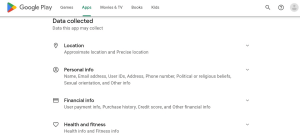
Privacy-conscious individuals might raise an eyebrow at Threads’ data collection practices. While a microblogging app typically requires only essential permissions, Threads goes beyond this standard. The app gathers a plethora of user data, extending beyond the content users willingly share. Information such as web browsing history, installed apps, health details, financial data, and even sensitive personal attributes are on the menu for collection.

This extensive data harvesting raises concerns about how Meta intends to use this information and whether user privacy is being adequately respected. Users who prioritize control over their personal data may find Threads’ approach discomforting.
Threads app
Image by https://www.makeuseof.com/

Meta’s Track Record with User Data

Meta, formerly known as Facebook, has been entangled in several data privacy controversies. Notably, the Cambridge Analytica scandal resulted in a substantial fine, revealing the company’s struggles with safeguarding user data. More recent fines and legal challenges underscore the company’s ongoing issues in this arena.

The company’s history of privacy breaches and its approach to handling user data might give potential Threads users pause. The credibility of a platform rests heavily on its commitment to user privacy and security, areas where Meta has faced criticism and legal repercussions.

Threads app
Image by https://www.makeuseof.com/

Global Reach Challenges

Despite Threads’ rapid rise in popularity, its global accessibility is not guaranteed. The app’s launch encountered obstacles in the European Union (EU), preventing EU users from accessing it. This deliberate decision by Meta hints at concerns over EU regulations, including the Digital Markets Act, designed to prevent market power abuse by large companies.

Meta’s ongoing struggles with EU regulations and user data processing have implications for Threads’ ability to achieve true global reach. As the app’s accessibility hinges on compliance with these regulations, its future remains uncertain in regions subject to such legislation.

Threads app
Image by https://www.makeuseof.com/

Exploring Alternatives to Threads

For those seeking microblogging alternatives that prioritize privacy and offer a global reach, there are options beyond Threads. The Fediverse, a network of federated servers, presents a decentralized and privacy-focused alternative. Unlike platforms driven by data monetization, the Fediverse aims to provide a social experience without compromising user data.

In conclusion, while Threads may seem enticing as a Twitter alternative, potential users should carefully consider the factors outlined above. Dependency on Instagram, extensive data collection, Meta’s history with user data, global accessibility challenges, and viable alternatives all contribute to a well-rounded perspective. Making an informed decision about your microblogging platform ensures that your online interactions align with your values and priorities.


Introduction: Remove Threads

If you have a Threads account, you might have noticed a small Threads icon appearing on your Instagram profile. This icon serves as a shortcut, enabling you to swiftly access your Threads profile from within Instagram, eliminating the need to switch between apps manually.

However, there could be several reasons why you’d want to remove this icon. Perhaps you prefer to maintain a clear separation between your Instagram and Threads accounts, or you simply find the icon’s presence less appealing. Irrespective of your motive, this guide will walk you through the process of removing the Threads shortcut.

Remove Threads Icon From Your Instagram Profile

Thankfully, removing the Threads shortcut from your Instagram account is a straightforward process:

  1. Open the Instagram app on your device and locate your profile picture at the bottom right corner.
  2. Tap the “Edit profile” button.
  3. Within the editing options, find the toggle next to “Show Threads shortcut” and disable it.
  4. Confirm your changes by tapping the checkmark icon positioned at the top right corner of your screen.

By following these steps, you’ve successfully eliminated the Threads shortcut from your Instagram profile. Remember, even after this removal, you can still access Threads effortlessly through your device’s home screen or app drawer. If you ever decide to revert and reintroduce the Threads shortcut to your Instagram profile, you can effortlessly follow the same steps and reactivate the toggle.

It’s crucial to note that, at present, there’s no method to remove the Instagram icon from your Threads profile. It’s essential to understand that joining Threads means an intrinsic link between your Instagram and Threads accounts. Therefore, if your reason for discarding the Threads icon from your profile is to maintain a separation between the accounts, the removal will be limited to the Instagram interface.

Simplifying Your Instagram Profile

Threads, a product of Meta aiming to compete with Twitter, facilitates the sharing of text posts with your Instagram followers. When you create a Threads account, Instagram automatically adds a shortcut icon to your profile, offering direct access to Threads.

Should you choose to do so, removing this icon is entirely within your control, thanks to the steps detailed in this article. This allows you to curate your Instagram profile to match your desired level of simplicity. By discarding the Threads shortcut, you can maintain a clean and uncluttered appearance while still enjoying the features Threads has to offer.

Conclusion,

Ridding your Instagram profile of the Threads shortcut is a manageable task that grants you greater control over the appearance and functionality of your profile. Whether you seek to establish a boundary between your accounts or create a minimalist profile, the option to remove the Threads shortcut ensures your Instagram experience is tailored to your preferences.

Introduction: Google Account Third-Party Connections

In this digital age, convenience often comes at a cost – the risk of compromising your personal data. Have you ever connected your Google account to various third-party websites, only to find yourself bombarded with unwanted emails and notifications? Fret not! In this guide, we’ll show you how to effortlessly and securely revoke access from these connections, thereby enhancing your online experience and safeguarding your digital privacy.

Login to Your Google Account

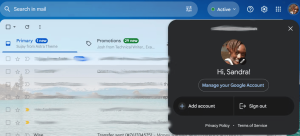
The first step on your journey to tidying up your Google account involves logging in. If you’re not yet a proud owner of a Google account, it’s a breeze to create one. Once you’re in, spot your profile picture on the right side of your navigation bar in any Google app. A simple click on your picture opens up a window with enticing options like “Manage your Google Account,” “Add account,” and “Sign out.”

Third-Party
Image by https://www.makeuseof.com/

Go to Manage Your Google Account

Embrace the “Manage your Google Account” button and feel the rush as you’re transported to a world of settings and customization. A plethora of options awaits you on the left side of the screen, each promising to enrich your Google experience.

Third-Party
Image by https://www.makeuseof.com/

Head to Security Settings

In this digital fortress of settings, locate and tap on “Security.” A few clicks later, you’ll be standing in the heart of your account’s security settings, ready to tame the digital beasts.

Third-Party
Image by https://www.makeuseof.com/

Find Your Connections to Third-Party Apps

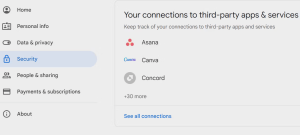
Scroll down with purpose until you discover the section labeled “Your connections to third-party apps and services.” This is where the magic happens – all the websites leeching off your Google account are laid bare before you.

Third-Party
Image by https://www.makeuseof.com/

Remove Any Unwanted Connections

With a decisive click on the offending website, you’ll be whisked away to another page. Behold the power to choose: either sign into the website or obliterate all connections with it.

Third-Party
Image by https://www.makeuseof.com/

Remove Connections With Unwanted Apps

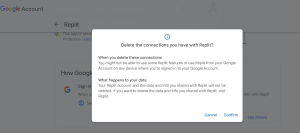
Ready to sever the ties? Opt for the nuclear option – “Delete connections.” Confirm your decision in the ensuing pop-up window, and watch as Google diligently executes your command. Success!

Unfortunately, if you’re harboring a swarm of connections, each must be evicted individually. While mass eviction isn’t feasible, this meticulous process ensures thorough cleansing.

Third-Party
Image by https://www.makeuseof.com/

Why Revoking Unwanted Connections is Important

As you bid adieu to pesky notifications and invasive emails, you’re not only decluttering your digital life but also bolstering your Google account’s security. These third-party connections can serve as gateways for potential threats and vulnerabilities. By reclaiming control, you’re actively fostering a safer online haven for yourself.
Conclusion

Your Google account is a treasure trove of personal information, and it deserves to be treated with care and respect. By following the steps outlined above, you can effortlessly purge unwanted third-party connections, reclaim your privacy, and enjoy a more streamlined and secure online experience. Remember, the key lies in taking charge of your digital narrative – one connection at a time.

OpenStreetMap (OSM) vs. Google Maps

In the realm of digital navigation tools, Google Maps has long reigned as a prominent player, but there’s an alternative that’s gaining recognition and, in many aspects, surpassing the giant—OpenStreetMap (OSM). This community-driven map platform offers a refreshing array of features that set it apart from its well-known counterpart. Let’s dive into the six key reasons why you should seriously consider OpenStreetMap over Google Maps for your navigational needs.

1. Embrace Community Power: OpenStreetMap’s Collaborative Essence

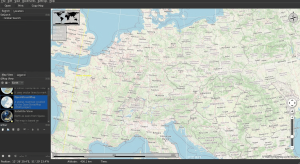
While Google is a corporate behemoth, OpenStreetMap takes a different approach. It thrives on the collective efforts of a diverse and ever-growing community of volunteers. Unlike Google’s closed setup, OSM’s volunteer-driven model brings a host of advantages. Diverse viewpoints lead to richer map data, ensuring accuracy and completeness. Additionally, bugs are swiftly identified and resolved, thanks to the vigilant community. The heart of OpenStreetMap lies in the hands of those who are genuinely passionate about its success. The door is open for anyone willing to contribute.

OpenStreetMap
Image by https://www.makeuseof.com/

2. Ad-Free Navigation: A Clear Advantage of OpenStreetMap

Google’s prime motive is profit, often achieved through advertising. As a result, Google Maps tends to bombard users with ads that can obscure vital information. OpenStreetMap, on the other hand, champions clarity. While it includes markers for important places, they are designed to be informative, not intrusive. These markers don’t hijack your attention and don’t clutter the map, allowing you to focus on what truly matters—navigating your world smoothly.

OpenStreetMap
Image by https://www.makeuseof.com/

3. Flexibility Across Apps: OpenStreetMap’s Versatile Integration

Google Maps remains confined to its ecosystem, limiting your choices. OpenStreetMap thrives on openness. Its maps are free to use, adapt, and integrate into various applications. Whether you’re accessing maps on your browser or embedding them into your favorite apps, the possibilities are endless. Notable apps like OSMand+ and Magic Earth leverage OpenStreetMap’s data to offer seamless navigation experiences. Say goodbye to platform restrictions.

OpenStreetMap
Image by https://www.makeuseof.com/

4. Unveiling the Unseen: OpenStreetMap’s Detailed Cartography

OpenStreetMap’s unique selling point lies in its inclusivity. It encourages contributors to map lesser-known locations that might escape Google’s attention. Unmarked tracks, historic rights-of-way, and public footpaths find their place on OSM’s maps. This dedication to detail means you can uncover hidden gems, explore off-the-beaten-path routes, and discover the shortest, most accessible trails. Experience your surroundings in a way that Google Maps simply can’t provide.

5. Navigational Freedom: Specialized Routing with OpenStreetMap

Navigating isn’t always straightforward, and everyone’s mode of transportation differs. Google Maps offers a handful of options, but OpenStreetMap takes it further. Whether you’re traveling on horseback, skis, motorcycle, or boat, OSM has specialized routing options that cater to your unique needs. These options go beyond Google’s standard choices, ensuring your journey is optimized and tailored to your chosen means of travel.

OpenStreetMap
Image by https://www.makeuseof.com/

6. Mapping Your World Offline: OpenStreetMap’s Comprehensive Offline Use

The name may say “street,” but OpenStreetMap offers far more than just road data. Through platforms like OSMand+, you can access nautical maps, travel guides, and even Wikipedia articles, enhancing your understanding of your surroundings. The best part? You can download this wealth of information and use it offline. Google Maps falls short in comparison, with limited offline capabilities due to various constraints.

In Conclusion,

Google Maps may have a broader brand presence, but OpenStreetMap shines as a robust alternative. Its community-driven essence ensures accuracy, while its ad-free approach provides a distraction-free experience. With OpenStreetMap, you’re not limited to a single app ecosystem; the maps are yours to use and integrate wherever you please. Delve deeper into your surroundings with OSM’s attention to detail and specialized routing options. And when you’re offline, OpenStreetMap remains your reliable guide.

In a world where big-tech’s motives can raise eyebrows, OpenStreetMap stands tall as an open-source, community-powered gem. If you’re ready to break free from the mainstream and experience navigation on your terms, OpenStreetMap beckons with open arms.

So, the next time you’re on a quest to explore the world digitally, remember that the path less taken—OpenStreetMap—could lead you to a more enriching and personalized journey.

How Far Has BlackBerry Fallen?

BlackBerry’s fall was more striking than other smartphone makers due to its once-dominant market position. In December 2011, Statista noted that BlackBerry held a substantial 33.02% smartphone market share in the UK. Within two years, it plummeted by nearly half to 17.44%. Fast forward to December 2021, and BlackBerry’s market share in the UK had collapsed to 0%.

On the global stage, BlackBerry’s downfall was equally spectacular. Gartner’s February 2017 report indicated that only 210,000 devices with its OS were sold in Q4 2016. Even worse, Q4 2015 had seen less than 907,000 devices sold, constituting a mere 0.2% market share.

BlackBerry
Image by https://www.makeuseof.com/

Why BlackBerry Declined So Badly

The decline of BlackBerry wasn’t an abrupt occurrence; it stemmed from a culmination of years of questionable decisions.

1. Slow to Adapt

During its zenith, BlackBerry was synonymous with innovation. BlackBerry Messenger revolutionized messaging, and its devices propelled smartphones to their current status as portable mini-computers. Yet, the BlackBerry Storm’s premature introduction of touchscreen technology failed to gain widespread acceptance.

The issue persisted as BlackBerry continued to emphasize physical keyboards despite the rising demand for touchscreens. Other factors, such as Wi-Fi connectivity problems, hindered the Storm’s success. BlackBerry’s failure to adapt in areas like camera technology also played a role.

BlackBerry
Image by https://www.makeuseof.com/

2. Losing Its Core Market

BlackBerry’s emphasis on catering to businesses blinded it to the iPhone’s potential impact. The design of BlackBerry devices reflected this, offering limited capabilities compared to early iPhones, which targeted everyday consumers.

As time elapsed, consumer-oriented phones became prevalent in business settings too, offering more features than BlackBerry devices. Accessibility and convenience drove these phones’ popularity, traits desired by corporate employees as well.

BlackBerry
Image by https://www.makeuseof.com/

3. The BlackBerry Operating System

Loyalty to its OS, despite glaring flaws, contributed to BlackBerry’s decline. Early OS versions lacked the app variety available on Apple and Android devices. Although BlackBerry eventually expanded its app store, the damage was done.

User experience issues and performance glitches plagued BlackBerry devices, and even transitioning to Android failed to fully address these problems.

BlackBerry
Image by https://www.makeuseof.com/

Could BlackBerry Make a Return?

BlackBerry’s glory days in smartphones may be over, as evident from its decommissioned legacy software and phone operating systems. Nevertheless, the company’s complete demise is not a certainty.

BlackBerry
Image by https://www.makeuseof.com/

New Products and Services

Despite shrinking significantly, BlackBerry’s shift towards cybersecurity and B2B services sustained its relevance. With a focus on securing hybrid and remote work environments, BlackBerry offers AI-powered systems to counter ransomware and other threats.

The company’s revenue, though far from its peak, still remains substantial, showcasing its adaptability and resilience. Reuters reported that BlackBerry anticipates revenue ranging from $800 million to $960 million by 2026.

BlackBerry’s Failures Can Teach Smartphone Companies a Lot

BlackBerry’s decline serves as a profound lesson in business and innovation. While competitors like Apple excelled by envisioning the future of consumer smartphones and adapting to it, BlackBerry’s failures were largely self-inflicted.

BlackBerry’s pivot towards cybersecurity demonstrates a wiser approach, leveraging its strengths in B2B products and services. While BlackBerry smartphones might be history, its technological influence is far from obsolete, as its innovations continue to shape industries.

Conclusion,

BlackBerry’s dramatic downfall from smartphone dominance highlights the importance of adaptability, understanding market dynamics, and learning from mistakes. Its resurgence as a cybersecurity-focused company underscores the potential for reinvention in the ever-evolving tech landscape.

Introduction: Temporary Files in Windows

Temporary files are like unwelcome guests—eventually, you want them to leave. But what happens when they decide to overstay their welcome? In this guide, we’ll walk you through various methods to bid farewell to these stubborn temporary files that just won’t go away.

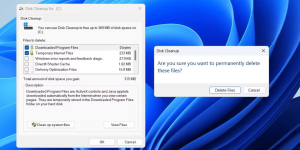
Using Disk Cleanup Tool

Windows provides built-in tools to deal with temporary files, and the Disk Cleanup tool is a standout option. If the standard methods of deletion fail, this tool might just do the trick.

  1. Press Win + S to access the search menu.
  2. Type “disk cleanup” and press Enter.
  3. Choose the drive you want to clear temporary files from.
  4. Select the files you want to remove.
  5. Confirm by clicking “Delete Files.”

    Temporary Files
    Image by https://www.makeuseof.com/

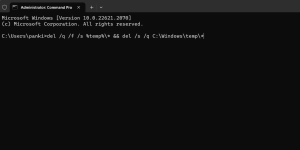
Command Prompt Method

If Disk Cleanup doesn’t quite cut it, the Command Prompt can be your next best friend. But don’t worry; it’s not as complex as it may sound.

  1. Right-click the Start icon and choose “Terminal (Admin).”
  2. Approve the User Account Control prompt by selecting “Yes.”
  3. Copy and paste the following command and hit Enter:

Temporary Files
Image by https://www.makeuseof.com/


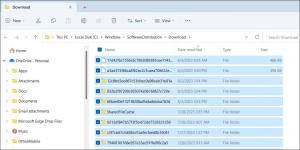
Emptying Software Distribution Folder

Windows loves to save update files in the Software Distribution folder before installing them. But when updates get stuck, these files can pile up. Here’s how to clear the clutter:

  1. Press Win + S and search for “services.” Press Enter.
  2. Find the Windows Update service, right-click, and choose “Stop.”
  3. Press Win + R and enter: C:\Windows\SoftwareDistribution\Download
  4. Select all files, hit the trash icon, and delete.
  5. Restart the Windows Update service from the Services window.

    Temporary Files
    Image by https://www.makeuseof.com/

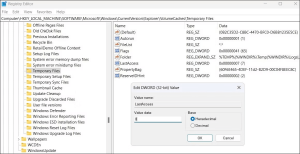
Editing Registry Files

The Disk Cleanup utility might spare recent temporary files, but what if you want them all gone? Tread carefully here, as editing the Windows Registry requires caution:

  1. Press Win + R and type “regedit” before pressing Enter.
  2. Approve the User Account Control prompt.
  3. Navigate to HKEY_LOCAL_MACHINE > SOFTWARE > Microsoft > Windows > CurrentVersion > Explorer > VolumeCaches > Temporary Files.
  4. Double-click the “LastAccess” key and set the Value data as 0.
  5. Restart your PC and attempt temporary file deletion again.

    Temporary Files
    Image by https://www.makeuseof.com/

Safe Mode Booting

Third-party programs and services can be stubborn obstacles to deleting temporary files. Enter Safe Mode—your refuge from such interference:

  1. Boot into Safe Mode using appropriate methods.
  2. Once in Safe Mode, try deleting the temporary files again.

Conclusion

Temporary files might cling to your Windows PC like barnacles to a ship, but you need not tolerate their presence. By employing the methods outlined in this guide, you can bid farewell to these files and enjoy a cleaner, more optimized system. Whether you opt for the Disk Cleanup tool, Command Prompt, Registry editing, or Safe Mode booting, you’re on the path to a smoother Windows experience.

Introduction to Security Identifier (SID) in Windows 11

Each user account in Windows 11 is associated with a distinct SID, preventing any duplication and facilitating reliable user tracking. SIDs are crucial for maintaining system integrity and ensuring user-specific privileges.

Methods to Find SID in Windows 11

While the “whoami” command is a popular choice for obtaining SIDs, there are multiple methods to access these identifiers on your Windows 11 PC.

Using Command Prompt to Retrieve SID

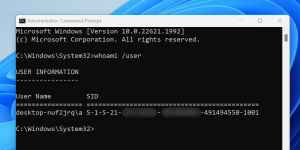
The simplest method involves utilizing the Command Prompt. By employing the “whoami” command with the “user” argument, you can effortlessly display the SID of the currently logged-in user. This approach provides a quick way to acquire the information you need.

Windows 11
Image by https://www.makeuseof.com/

Using WMIC for SID Retrieval

Windows 11
Image by https://www.makeuseof.com/

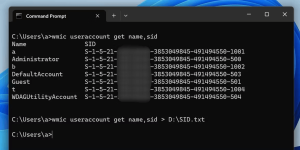
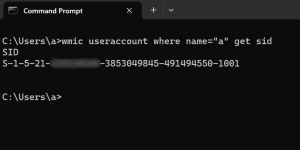
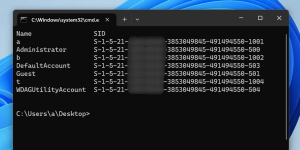
For a broader view of SIDs, the WMIC command-line tool comes in handy. With a few straightforward steps, you can view the SIDs of all users or even a specific user account. The flexibility of this method ensures you can gather the required data without extensive commands.

Windows 11
Image by https://www.makeuseof.com/

PowerShell Cmdlet for SID Viewing

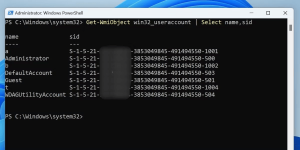
PowerShell introduces the Get-WmiObject cmdlet, enabling you to access SIDs for all user accounts on your Windows 11 PC. This approach streamlines the process, allowing you to retrieve comprehensive SID information with ease.

Windows 11
Image by https://www.makeuseof.com/

Finding SIDs via Registry Editor

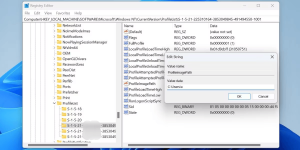
In cases where other methods might not be accessible, the Windows Registry Editor presents an alternative route to uncover SIDs. Although more manual, this method empowers you to locate SIDs by navigating through the Registry’s structure.

Windows 11
Image by https://www.makeuseof.com/

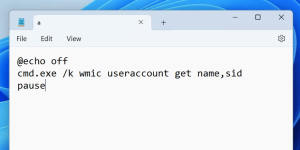
Creating a Batch File for Quick SID Check

Windows 11
Image by https://www.makeuseof.com/

For those who prefer efficiency and simplicity, crafting a batch file provides a quick solution. By creating a custom batch file, you can swiftly view the SIDs of all users on your Windows 11 machine. This technique proves valuable when you require instant access to this critical information.

Windows 11
Image by https://www.makeuseof.com/

Simplify SID Check Process

In summary, discovering the SID of any user in Windows 11 involves several approaches. If you need to swiftly identify the logged-in user’s SID, the Command Prompt’s “whoami” command is your go-to. Alternatively, WMIC offers a comprehensive view, PowerShell adds versatility, the Registry Editor is a manual option, and a batch file streamlines the process.

Understanding these methods empowers you to choose the most appropriate option based on your specific needs. Whether you’re troubleshooting or ensuring system security, the ability to find SIDs efficiently contributes to a smoother Windows 11 experience.


1. The Legacy of Adobe Flash Games

The era of Adobe Flash has come to an end, yet its gaming legacy persists. Despite Adobe’s discontinuation of Flash Player support in 2020, the gaming community is finding ways to keep playing Flash games and accessing a multitude of titles.

2. The Demise of Adobe Flash

The decline of Adobe Flash was a long time coming. Apple’s refusal to support Flash on its iOS devices in 2010 marked a significant blow. Criticized for performance issues, energy consumption, and security vulnerabilities, Flash faced mounting challenges. However, Flash’s inception in 1998 revolutionized the internet, turning it from a static landscape to the interactive realm we know today. The gaming community quickly adopted Flash, employing it to build captivating video games.

3. The Evolution of Flash Gaming

The evolution of Flash gaming was driven by pioneers like Tom Fulp, who launched Newgrounds in 2000. Newgrounds provided a platform to instantly share and enjoy Flash games and content, even before the rise of platforms like YouTube. By the time Adobe ended Flash support, a vast collection of games had been created with the technology, including unexpected players like Nintendo.

4. Preserving the Flash Gaming Experience

Despite the discontinuation of Flash, efforts to preserve Flash games are ongoing through various projects:

1. BlueMaxima’s Flashpoint

BlueMaxima’s Flashpoint, initiated by Ben Latimore, has grown into a significant web game preservation project. With over 150,000 games and 25,000 animations, Flashpoint caters to different platforms. It offers two versions: Ultimate, a comprehensive offline-ready collection, and Infinity, a smaller download-and-play version.

Adobe Flash
Image by https://www.makeuseof.com/

2. The Flash Game Archive

The Flash Game Archive, led by Dragom, is a free repository of Flash games. Offering a client for local play, this project aims to safeguard Flash games from being lost. By joining the Flash Game Archive Patreon, users gain early access and the ability to request new game additions.

Adobe Flash
Image by https://www.makeuseof.com/

3. The Internet Archive

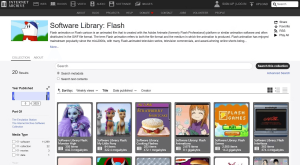
The Internet Archive’s Emularity project, coupled with the Ruffle Flash emulator, allows users to play Flash games without Flash. Ruffle, built in Rust, ensures compatibility across browsers supporting Webassembly, eliminating the need for Adobe Flash Player.

Image by https://www.makeuseof.com/

4. Newgrounds

Newgrounds, a veteran in the Flash gaming scene, develops its Flash player to sustain its classic content. While requiring Adobe’s Flash plugin, Newgrounds Player offers a seamless browsing experience and preserves the site’s iconic Flash games.

Adobe Flash
Image by https://www.makeuseof.com/

5. The Legacy Lives On

Adobe Flash may have met its end, yet Flash games continue their journey. Despite its flaws, Flash was instrumental in shaping the internet’s interactive landscape and nurturing the indie gaming community. The plethora of Flash games created over two decades solidifies its place in gaming history, showcasing its impact on the gaming world.


Misinformation vs. Disinformation

In today’s digital age, false information is rampant on the internet, often causing confusion and even harm. However, it’s crucial to differentiate between misinformation and disinformation, as they have distinct meanings and implications.

Misinformation: Inaccurate Information Spread

Misinformation refers to inaccurate information that is shared without the intention to deceive. It’s often spread unknowingly and can have a significant impact, especially due to the rapid sharing facilitated by social media platforms.

For instance, the false claim that vaccines cause various health issues, such as infertility and autism, has led to resistance against important vaccinations. This demonstrates how misinformation can spread fear and undermine public health efforts.

Misinformation
Image by https://www.makeuseof.com/

Key Features of Misinformation

Misinformation is characterized by its inaccuracy and lack of verification. It exploits confirmation bias, where people tend to believe information that aligns with their existing beliefs. Misinformation spreads quickly, especially through social media, and may use deceptive images to lend credibility to its claims.

Impact of Misinformation on Society

The consequences of misinformation are far-reaching. It erodes trust in reliable sources, leading to confusion and misguided actions. Sectors like health and medicine are particularly vulnerable, as false information can jeopardize individual and public health. Moreover, misinformation can spark conflict, increase tension among different groups, and even promote violence.

Disinformation: Intentional Deception

Disinformation, on the other hand, involves deliberately spreading false information with the intent to deceive, manipulate, and create chaos. Unlike misinformation, disinformation is spread with malicious intent and often serves specific agendas.

Distinctive Features of Disinformation

Disinformation is crafted to mislead and incite. It’s strategically designed to resemble legitimate information, making it challenging to discern from accurate sources. The long-term impacts of disinformation persist even after being debunked. It often targets specific audiences based on their biases, further amplifying its impact.

Misinformation
Image by https://www.makeuseof.com/

Consequences of Disinformation

Disinformation can significantly damage trust in institutions, credible sources, and even media outlets. Its similarity to accurate information can lead to confusion, and it has the potential to exacerbate societal divisions by catering to confirmation biases. This can result in the acceptance of baseless and harmful beliefs, causing polarization and hostility.

Spotting Misinformation and Disinformation

To combat the spread of false information, it’s important to be vigilant:

  1. Verify and Cross-Check Details: Rely on reputable sources and cross-check information from multiple sources.

    Misinformation
    Image by https://www.makeuseof.com/
  2. Read Beyond the Headlines: Avoid clickbait and delve into the full content of articles.
  3. Consider Your Biases: Question information that aligns too closely with your existing beliefs.
  4. Watch Out for Misleading Images: Use reverse image search tools to verify images.

Addressing Misinformation and Disinformation

While misinformation and disinformation are prevalent challenges, they can be mitigated through responsible sharing, critical thinking, and verifying information before accepting or spreading it. By actively participating in the fight against false information, you contribute to a more informed and trustworthy online environment.

In conclusion, understanding the difference between misinformation and disinformation is essential for navigating the modern digital landscape. By staying informed and employing critical thinking, you can help counter the negative impacts of false information on both individuals and society as a whole.

Top 4 Music Lesson Sites

Music education is a pathway to creativity, joy, and personal growth. Whether you’re just starting out or a seasoned musician, there are online resources that can help you improve your musical abilities. In this article, we’ll explore the top 4 music lesson sites for beginners and pros, curated by experts in the field.
1. The Advantages of Online Music Lessons

While traditional in-person lessons provide personalized guidance, the convenience and flexibility of online music lessons have made them a popular choice. Learning music online allows you to progress at your own pace and fit lessons into your busy schedule. For those seeking to enhance their existing skills, online resources offer new chords, techniques, beats, and theory principles to elevate your playing.

2. Piano Lessons for Beginners: PianoLessons4Children.com

PianoLessons4Children.com is a fantastic platform for novice piano players. Tailored primarily for kids, it’s also ideal for adult beginners. These lessons stand out for their approach of getting students playing simple songs right away, ensuring immediate enjoyment. With instructional videos and sheet music, the website covers piano basics and popular children’s songs.

Lesson Sites
Image by https://www.makeuseof.com/

3. Drumming Insights: OnlineDrummer

OnlineDrummer caters to both beginners looking to improve their drumming skills and intermediate drummers seeking to master fundamentals. The site offers free lessons, including explanatory videos and sheet music, covering drum rudiments and more complex rhythms. Whether you’re starting or advancing, OnlineDrummer provides valuable insights and resources for drum enthusiasts.

Lesson Sites
Image by https://www.makeuseof.com/

4. Mastering the Guitar: Guitar Tricks

Guitar Tricks is a comprehensive resource for beginners and intermediate guitar players. The beginner guitar lessons teach string names and basic chords, while a free account unlocks more lessons, including fingerpicking and strumming patterns. With over 11,000 lessons, it’s a valuable platform for those looking to expand their guitar skills.

Lesson Sites
Image by https://www.makeuseof.com/

5. Elevate Your Music Skills: Soundfly’s Premium Courses

Soundfly is a premium platform suitable for advanced musicians and serious hobbyists. Offering free and subscription-based courses, it covers various aspects of music, including instrument playing, production, songwriting, and music business. Taught by industry professionals, these in-depth courses provide exceptional insights for musicians looking to take their skills to the next level.

Lesson Sites
Image by https://www.makeuseof.com/

6. Embrace the Joy of Making Music

Music is a universal joy, and playing an instrument adds a personalized touch to your musical experience. Whether you’re a beginner exploring a new hobby or a seasoned musician seeking improvement, these top music lesson sites offer valuable resources. As you embark on your musical journey, remember that consistent practice and a thirst for learning are key to achieving your musical goals.
In conclusion, the digital age has brought music education to your fingertips. The convenience, flexibility, and quality of online music lessons make them a worthwhile option for aspiring musicians of all levels. Explore the recommended platforms, and let your musical journey flourish.