



How to Control Location Permissions for System Services on Your iPhone
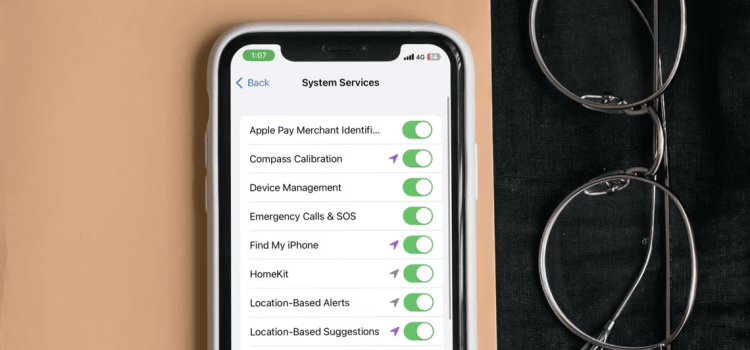
Your iPhone holds a wealth of personal data, and managing what it can access is paramount. While you may be aware of location access for apps, did you know that your iPhone’s system services also tap into your location data by default? In this guide, we’ll delve into the world of system services, discuss their significance, and teach you how to regain control over your iPhone’s location privacy.
Understanding System Services in Your iPhone’s Location Services
Your iPhone’s system services encompass a range of essential processes and features designed to optimize functionality and enhance user experience. When we refer to System Services within Location Services, it signifies that these built-in functionalities rely on your location data to operate efficiently. Crucially, the location information collected remains anonymous.
Let’s look at some practical examples of these services:
Find My iPhone
This service is a lifeline when your iPhone goes missing, helping you track its location and recover it.
Emergency Calls & SOS
During emergency calls, your location data is crucial for providing accurate information to first responders, ensuring timely assistance.
However, not all system services are as vital. Some, like Compass Calibration and Location-Based Suggestions, may have limited utility for most users and can even impact privacy and battery life. Here’s how to regain control:
How to Limit Location Permissions for Your iPhone’s System Services
- Access Your Settings: Open your iPhone’s Settings app.
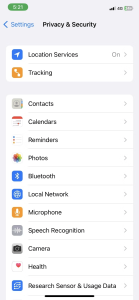
- Navigate to Privacy & Security: Scroll down and tap on “Privacy & Security.”
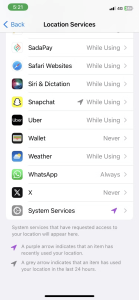
- Select Location Services: At the top, find and tap on “Location Services.”
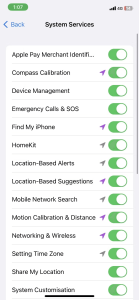
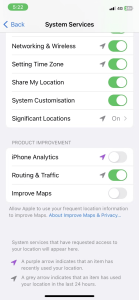
- Access System Services: Scroll down to the bottom of the page, and you’ll discover “System Services.” Tap it.
You’ll now see a list of features that utilize your location data, including:
- Compass Calibration
- Motion Calibration and Distance
- System Customization
To protect your privacy and optimize performance, toggle off the services you don’t require. By doing so, you regain control over your iPhone’s location information.
Taking Charge of Your iPhone’s Location Services
As you’ve discovered, many system services depend on your iPhone’s location data. While some are indispensable, others may not be vital for your daily use. By disabling unnecessary services, you strike a balance between protecting your privacy and ensuring optimal device performance.
In an era of rapid technological advancement, it’s crucial to wield your smartphone’s features wisely. With this knowledge, you can navigate the intricacies of your iPhone’s settings and safeguard your valuable data effectively.
Meet the Knowledge Source – Hiba Fiaz
Hiba Fiaz is a seasoned tech writer with a passion for demystifying complex tech topics. With years of experience in the field, she’s dedicated to helping readers make informed decisions about their tech gadgets. Hiba’s expertise shines through her ability to translate tech jargon into accessible, reader-friendly content.
Human-Centric Formatting: We’ve provided a step-by-step guide to empower readers to control their iPhone’s location services. Clear language, visuals, and concise explanations enhance user experience.